
In computer graphics, one of the key elements of the graphics pipeline is the View transformation, which is used in the vertex shading stage to convert coordinates from World space to View space. The View transform is usually constructed using a utility function like glm::lookAt() from the GLM library, or D3DXMatrixLookAtLH() in DirectX. But what are these functions actually doing? In this post we will do a deep dive into the math behind the glm::lookAt() function. This will also serve as a way to understand and put into practice some important concepts of linear algebra and geometry.
Before we go into the actual explanation, we need to lay some mathematical groundwork first.
The change of basis matrix
Theorem: consider the 


For the proof of this theorem see Sources. It’s the best explanation I’ve seen of the subject, rigorous and also elegant.
Key takeaways:
- In the above theorem it’s irrelevant which of the two bases represents the source and which represents the destination. We can swap them and the statement still holds. This means that if we want to convert coordinates in
- The basis change matrix from
can also be obtained as the inverse of the basis change from
- An interesting special case is when

Geometric interpretation of the change of basis matrix
Although not directly related to the lookAt function, there is an interesting geometric observation that we can make from the above theorem.
Consider the change of basis matrix from 

Taking inverse on both sides of the equation we get:


It is worth noting that the two matrices in the equation are expressed in different bases: the left side is a matrix that takes coordinates in
This is the geometric interpretation of the change of basis transform: converting coordinates in
To get an intuitive understanding of this observation, let’s use an example. Consider 


Say we want to compute the coordinates of 
![[i]_{DST}](https://s0.wp.com/latex.php?latex=%5Bi%5D_%7BDST%7D&bg=FFFFFF&fg=181818&s=0&c=20201002)


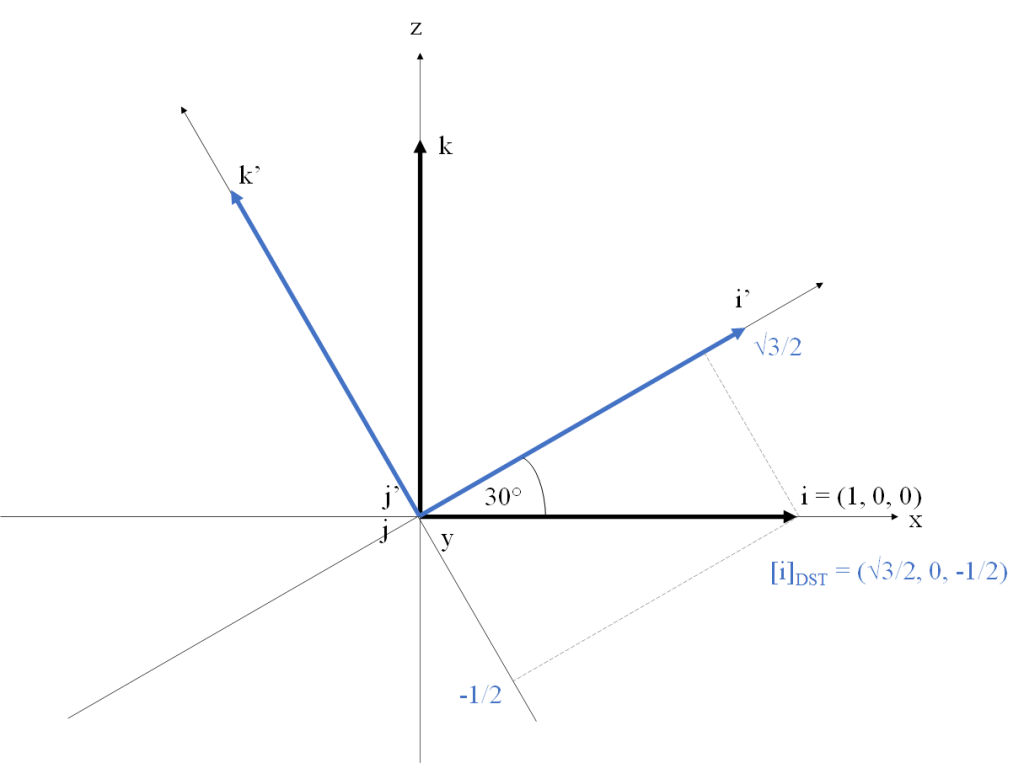
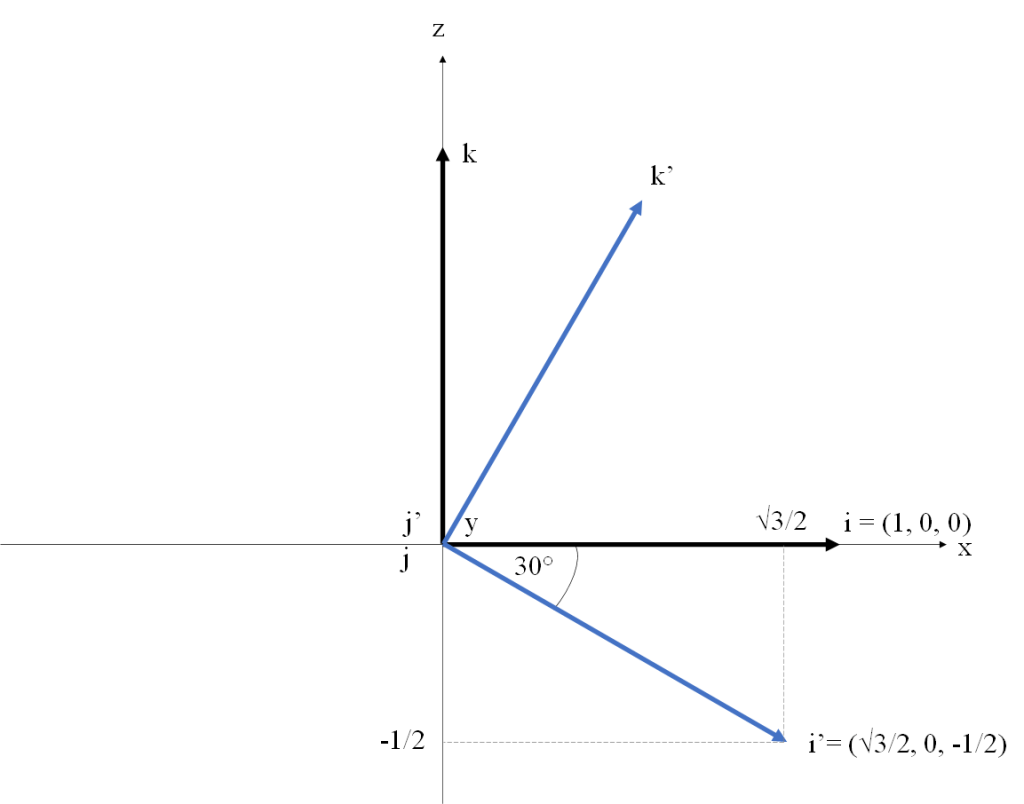
Alternatively, we can leave the basis fixed and rotate the vector
Projection of a vector onto another vector
Given a vector space 


The projection of 
This is related to the concept of coordinates. Given a base 


An interesting special case is when all the 

Affine spaces and affine frames
The affine space is an algebraic structure that provides a natural abstraction to represent physical space. Informally, an affine space is an extension of a vector space where we add a set of points to distinguish them from vectors. The set of points doesn’t have an origin, and points cannot be added together, but a point can be added to a vector (sometimes called displacement vector) to yield another point which represents the translation of the point by the vector. Similarly, two points can be subtracted to give a displacement vector.
Given two affine spaces 


The set of points of an affine space doesn’t have an origin. In order to describe the coordinates of a point, we must arbitrarily define a point as origin and describe the coordinates of the displacement vectors relative to that origin. An affine frame is composed of a point 
Given a frame 


The
Note that although the point set of an affine space doesn’t have the concept of an origin point, we can always arbitrarily choose an affine frame, and this allows us to represent any point by its coordinates in that frame.
For a more formal and detailed description of the concepts of affine space and affine frame, see Sources.
Homogeneous coordinates
For an in-depth description of homogeneous coordinates and how they work, see see Sources.
What follows are the key takeaways of the subject, without going into much formality.
Every affine map can be represented as the composition of a linear map and a translation.
An affine map from 
Homogeneous coordinates allow us to represent an affine map in
Given an affine map 


(The upper-left components of 
Let

Then

(Note
In order to transform a point 


Define and be aware of your coordinate systems orientation
In order to build the view matrix, you will first need to choose the handedness of the world and view coordinate systems and the orientation of the camera in the view system. In theory, this choice is up to the programmer and doesn’t depend on the graphics API you are using. Graphics APIs don’t care about what coordinate systems you use for the world and view spaces. What they specify is the handedness and range of the Normalized Device Coordinate (NDC) system and the orientation of the camera in it. You are free to choose the model, world and view coordinate systems however you want as long as you build the model, view and projection matrices in such a way that the 
In practice, there may be external factors that constrain this choice though. For example, if you are working with OpenGL you will probably use the GLM library and build the view matrix using the glm::lookAt() function. If you use GLM, the library already has the decision of world and view coordinate systems made for you: both systems are right-handed, with Y pointing up and the camera looking down the negative Z axis. Historically, this has been the standard in OpenGL, from the times of the deprecated GLU library and the gluLookAt() function that glm::lookAt() is based on. The OpenGL NDC system is left-handed, with X pointing right, Y pointing up and the camera looking up the positive Z axis. All three cordinates X, Y and X vary between -1 and 1. You may have noticed that this change from right-handed to left-handed when going from view space to NDC is inconsistent. This quirk is a historical holdover in OpenGL, and is usually worked around by building the projection matrix so that it flips the Z axis (glm::perspective() does this internally).
In DirectX the NDC system is left-handed, with X pointing right, Y pointing up, and the camera pointing up the positive Z axis. X and Y range from -1 to 1, while z ranges from 0 to 1. Regarding the world and view coordinate systems, the API provides utility functions for building the view matrix for either a left-handed or right-handed view system (these are the D3DXMatrixLookAtLH() and D3DXMatrixLookAtRH()). However, given that the NDC system is left-handed, it’s natural to make your world and view systems that way as well.
In the Vulkan API, the NDC system is defined differently than OpenGL in order to avoid the inconsistency of going from right-handed to left-handed: the NDC is right-handed, with X pointing right, Y pointing down and the camera looking up the positive Z axis. X and Y vary between -1 and 1, but Z varies between 0 and 1. Note how Y points down and not up as in OpenGL. You’re on your own regarding how to establish the other coordinate systems.
Without loss of generality and for convention only, for the rest of this post we will work with world and view coordinate systems which are both right-handed. Our view system will follow the historical OpenGL convention: X points right, Y points up and the camera looks down the negative Z axis.
The problem
Now we are ready to formally state the problem of building the view matrix. What we usually call world space is an affine space. We have a point in space which we establish as the origin for the vector space. We have a right-hand coordinate system where the 
The camera’s position is defined by a point 

The job of the view matrix is to convert coordinates from the world frame to the view frame. This is an affine map, so we represent it with a 4×4 matrix. Our problem is: given the 


Solution
The first thing we will need to do is compute the vectors 

The

Having 

It’s worth noting that the construction of the three vectors of the view base is the only step in this process that depends on the handedness of the world and view coordinate systems and the orientation of the camera in the view frame. If you are using OpenGL with glm::lookAt(), your view base will be D3DXMatrixLookAtLH(), your view base will be 
Now that we have the vectors of view frame, let’s go back to the definition of affine coordinates. Say that we have a point 


Once we have that, we have the displacement vector expressed by its coordinates in the basis of the world frame. We need to convert it to coordinates in the basis of the view frame. This is a basis change, where our

Now all we need is to combine the two steps:

That’s it! It’s a translation to compute the displacement vector with respect to the camera glm::lookAt() and D3DXMatrixLookAtLH() functions are doing internally.
Geometric interpretation of the lookAt() matrix
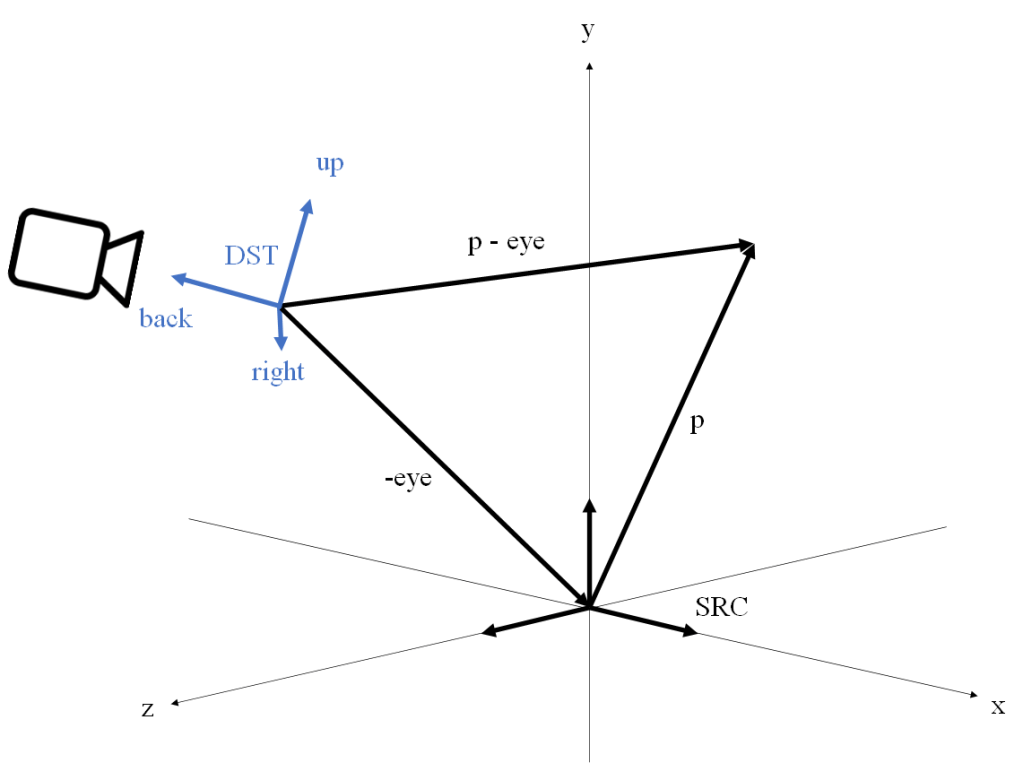
The following figure illustrates the coordinate conversion from the world frame to view frame. Following the previous argument, the geometric interpretation is that we are computing the vector

However, looking at the way the lookAt matrix is built, there’s an alternative geometric interpretation that we could make. Note that if we define the alternative translation matrix

Then the following matrix multiplication yields the same matrix

You can do the multiplication in a sheet of paper to confirm this. Note this is similar to the multiplication from before except that now we apply the linear component first, and translate afterwards using a different translation vector. What does this mean? Remember the geometric meaning of the dot product. When we compute the dot product of a vector 


Sources
- About the change of basis theorem and its proof: https://www.statlect.com/matrix-algebra/change-of-basis#:~:text=The%20change%20of%20basis%20is,originally%20employed%20to%20compute%20coordinates
- Wikipedia on Affine spaces and Affine frames: https://en.m.wikipedia.org/wiki/Affine_space
- Wikipedia on homogenous coordinates: https://en.m.wikipedia.org/wiki/Homogeneous_coordinates
- Wikipedia on projection of a vector onto another vector: https://en.wikipedia.org/wiki/Vector_projection
 Morning Flow