The perspective transformation and collinearity

The Last Supper by Lenardo DaVinci

When working with the graphics pipeline, the perspective projection is commonly used to give a realistic depiction of a scene, where objects close to the camera appear larger than objects far away. The perspective transformation has the important feature of mapping 3D lines to 3D lines. In this post we will go into why this property is important and give a proof of it.

The reader should have some familiarity with the graphics pipeline and the role the projection transformation plays in it. The Sources section provides good resources on the subject.

Coordinates setup

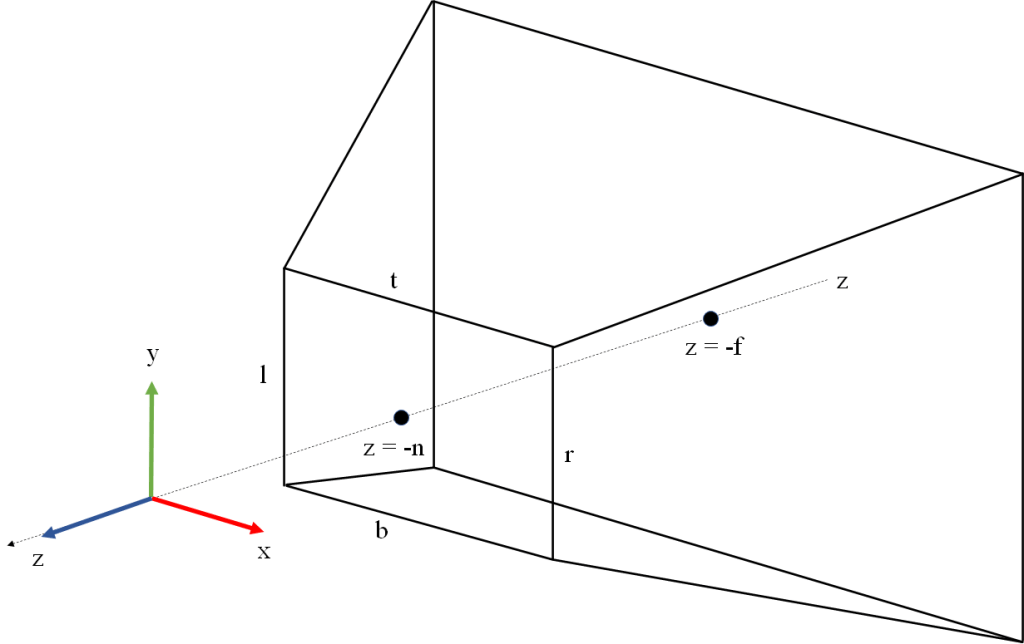
In the following we will assume that our view space is a right-hand coordinate system, has X pointing right from the camera, Y pointing up, and Z pointing back from the camera. This is the traditional setup of the view coordinate system in OpenGL applications.

Within the view space we define our viewing frustum by a near plane orthogonal to the Z axis placed at z = -n, a far plane orthogonal to Z placed at z = -f (so n and f are positive numbers). The near face of the frustum is delimited by X ranging from l to r, and Y ranging from b to t. Note this frustum is not necessarily symmetrical. In practice it is usual to use a symmetrical frustum, but this can be easily inferred as a special case. The view frustum is illustrated in Figure 1.

Figure 1. The view frustum.

Our NDC (Normalized Device Coordinates) system will be right-handed with X pointing right, Y pointing down, and Z pointing into the screen. The canonical view volume is defined by X and Y ranging from -1 to 1, and Z ranging from 0 to 1. The canonical view volume is illustrated in Figure 2. This NDC setup is how Vulkan defines it in its spec.

Other rendering APIs use different NDC setups. OpenGL defines its NDC as a left-hand coordinate system, with X pointing right, Y pointing up, Z pointing into the screen, and all three coordinates ranging from -1 and 1. DirectX defines its NDC as left-handed, with X pointing right, Y pointing up, Z pointing into the screen, X and Y ranging from -1 to 1 and z ranging from 0 to 1.

We have defined our view coordinate system with the approach usually employed in OpenGL applications. This should be natural for those accustomed to working with this API, and also has the advantage that the Y axis points up allowing us to think of Y as “height”. Note however, that since the Vulkan NDC has Y pointing down and Z pointing in the same direction as the camera, we will need to define our projection transformation with negative coefficients in Y and Z, in order to flip the direction of these axes.
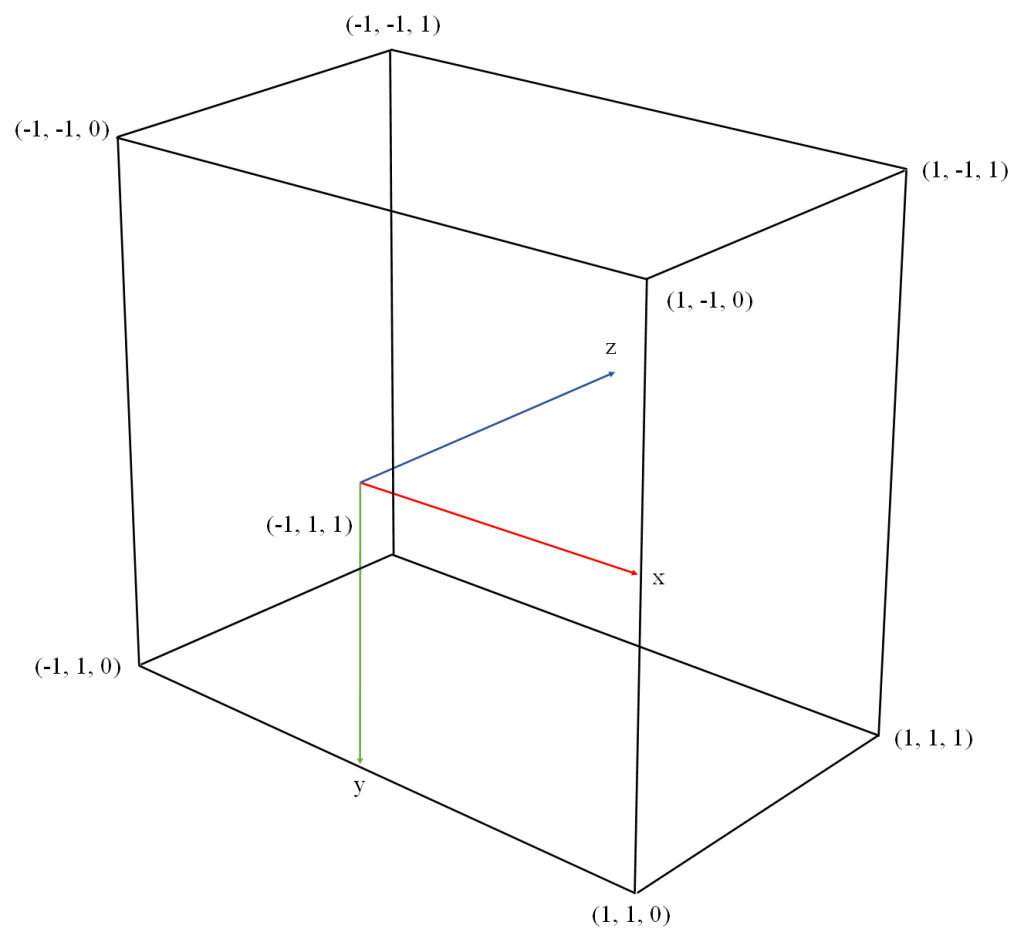
Figure 2. The canonical view volume in Vulkan NDC.

The perspective transformation

With the above coordinates setup (mapping z to the interval [0, 1]) the perspective transformation can be described by the following matrix:

P = \begin{pmatrix} \frac{2n}{r-l} & 0 & \frac{r+l}{r-l} & 0 \\ 0 & \frac{2n}{b-t} & \frac{b+t}{b-t} & 0 \\ 0 & 0 & \frac{f}{n - f} & \frac{fn}{n - f} \\ 0 & 0 & -1 & 0 \end{pmatrix}

Remember there is an implicit division by w after the matrix is applied. Note also that we have defined the fourth row of the matrix as (0, 0, -1, 0), so w' = -z. That is to say, when we divide by w in clip space we are actually dividing by the view space -z.

For a detailed derivation of this matrix, see Sources. The explanation in that page is oriented towards the OpenGL NDC system so the matrix they build is different from our Vulkan-oriented matrix, but they show a generic method that can be used to derive the perspective matrix with any NDC setup.

Projection and the graphics pipeline

As a reminder, the following is a simplified summary of the steps of the graphics pipeline in a typical application and the role the projection matrix plays in it. Some details like the orientation of the framebuffer coordinate system vary depending on the graphics API. This summary assumes we are working with Vulkan. For a more detailed description see Sources.

  • The model space coordinates of each vertex are input into your vertex shader.
  • Your vertex shader takes the model space coordinates of the vertex, converts them to homogenous coordinates by adding a w component with value 1, and multiplies the homogeneous vector by the 4×4 model matrix to obtain the world space coordinates.
  • The vertex shader takes the world space coordinates and multiplies them by the view matrix to obtain the view space coordinates.
  • The vertex shader takes the view space coordinates and multiplies them by the projection matrix P above to obtain the clip space coordinates. This is what the vertex shader returns. The vertex shader may combine the model, view an projection matrices into a single multiplication and return P * V * M * v_{model}.
  • The clip space coordinates returned from the vertex shader are divided by their w component to obtain Normalized Device Coordinates (NDC). This step is sometimes called perspective division. This is a fixed function step.
  • The NDC are converted to framebuffer space (called window space in OpenGL) with an affine transform. The window space coordinates describe the vertex position in a coordinate system that has its origin in the top left corner of the window, and is scaled so that pixels have width and height 1 . This is a fixed function step.
  • Primitives are rasterized (converted to a set of samples called fragments). For each fragment, its barycentric coordinates are computed in framebuffer space, and then its framebuffer space coordinates x', y', z' are computed by linearly interpolating the framebuffer space coordinates of the primitive vertices, using the barycentric coordinates of the fragment as weights. The framebuffer space z coordinate in particular is relevant because it will be used in the z test. This is a fixed function step.
  • The fragment’s vertex attribute values (e.g. texture coordinates) are computed via perspective-correct interpolation of the vertex attributes of the vertices. This involves using the view space (pre-projection) z values at the vertices. This is a fixed function step.
  • Early z test: if the driver and GPU support it (most do) and our pipeline doesn’t write to the depth buffer or use discard in the fragment shader, the pipeline will probably do the early z test at this point. The fragment’s z coordinate in framebuffer space is compared against the value stored in the depth buffer for the current pixel. If the fragment’s z is greater or equal than the value stored in the depth buffer, it means the fragment is occluded so it is discarded. Otherwise, the depth buffer is updated with the framebuffer z value of the fragment and processing of the fragment continues. This is a fixed function step.
  • Your fragment shader is invoked with the framebuffer space coordinates of the fragment as input.
  • If we have a stencil buffer attached, the stencil test is performed.
  • If the pipeline wasn’t able to do the early z test, z testing is performed at this point (late z test). Otherwise the late z test is skipped. The late z test involves the same read and possible write of the depth buffer described above in the early z test step.
  • The color returned from the fragment shader is written to the framebuffer.

The use of a depth buffer and a stencil buffer is optional in the graphics pipeline, but its use is so common that we have included it in the summary.

The collinearity property

The perspective projection doesn’t preserve parallelism. Parallel lines in view space get mapped to lines that meet in a point, the projection of which over the near plane is called their vanishing point.

Parallel lines are projected to lines that intersect at a vanishing point. Photo by Joshua Burdick on Unsplash

Lengths are not preserved either. Points get shifted inwards and backwards towards the far plane, and the farther from the near plane we go the more shifted they are. This generates the effect of far away objects looking smaller than objects of the same size that are closer to the camera.

However, the perspective projection as defined above has the important property that 3D lines in view space (after applying perspective division) get mapped to 3D lines in framebuffer space. Note we are not only talking about lines being mapped to lines in the projection plane: the 3D coordinates post projection also remain aligned, and this is important. For this reason we say that perspective is a projective transformation (it maps lines to lines, without preserving parallelism nor distances).

The key feature of the projection that is the cause of this property is the way the z coordinate is remapped in the third row of the projection matrix. When we look at the perspective matrix, we can see that after w division, the view space coordinates (x, y, z) will be mapped to framebuffer space coordinates (x', y', z') according to the following equations:

x' = (\frac{2n}{r-l})\frac{x}{-z} - \frac{r+l}{r-l}

y' = (\frac{2n}{b-t})\frac{y}{-z} - \frac{b+t}{b-t}

z' = (\frac{fn}{n - f})\frac{1}{-z} - \frac{f}{n - f}

Notice how x' and y' are hyperbolic functions of z. If we had left z' as a linear function of z, our straight lines would turn into hyperbolas after projection. For a good graphical depiction of how this would look like, see Sources.

The mapping of z' as another hyperbolic function of z has the effect of compensating the curve of x' and y' and producing a straight line. Note this preserves collinearity, but not lengths: points that are equally spaced across the line in view space will get shifted along the line towards the far plane in a non linear fashion.

Remember that the graphics pipeline needs to determine the value of the framebuffer space z for each fragment, based only on the framebuffer space z values at the vertices of the primitive. This is done by doing a linear interpolation of the framebuffer space z values at the vertices (i.e. a linear combination of the vertices’ z values using the sample’s barycentric coordinates as weights). This is the reason the collinearity property is important: if straight lines in view space were turned into curves after projection, this linear interpolation would be impossible.

Note that here we are talking about the linear interpolation of the framebuffer space z values, which is used in depth testing to discard occluded fragments. This should not be confused with the perspective-correct interpolation of vertex attributes, which is done using the clip space w (which takes the value of the pre-projection view space -z) and is therefore independent of how the projection remaps z.

Formal statement of the collinearity property

For the purposes of stating the collinearity property in formal terms, there is an important observation that will allow us to present the theorem in a more simple and elegant way. Note that the way we have defined the perspective projection can be divided in two steps:

  • Dividing input coordinates by z to make far away objects look smaller (projective component).
  • Multiplying by scalars and adding scalars in order to adjust the ranges and orientations of x', y' and z' to those expected by NDC (affine component).

The affine component doesn’t affect collinearity (we already know it will map lines to lines due to it being an affine transformation ). In order to prove that perspective maps lines to lines, it’s enough to show that the projective component does. Note that the projective component doesn’t need to flip Y or Z, this is part of the job of the affine component.

Theorem. Let A = (x_A, y_A, z_A) and B = (x_B, y_B, z_B) be two points in \mathbb{R}^3, and S = \frac{A + B}{2} their mid point. We define a perspective transformation as the function f : \mathbb{R}^3 \rightarrow \mathbb{R}^3 defined by the formula f(x, y, z) = (\frac{x}{z}, \frac{y}{z}, \frac{1}{z}). Let A', B' and S' be the images of A, B and S through f respectively. Then the point S' lies on the line segment \overline{A'B'}. This is to say, there exists a \lambda \in \mathbb{R} such that S' = \lambda A' + (1 - \lambda) B'.

Proof

From the definition of f we have:

A' = (\frac{x_A}{z_A}, \frac{y_A}{z_A}, \frac{1}{z_A})

B' = (\frac{x_B}{z_B}, \frac{y_B}{z_B}, \frac{1}{z_B})

S' = (\frac{x_A + x_B}{z_A + z_B}, \frac{y_A + y_B}{z_A + z_B}, \frac{2}{z_A + z_B})

We can separate S' as:

S' = (\frac{1}{z_A + z_B})(x_A, y_A, 1) + (\frac{1}{z_A + z_B})(x_B, y_B, 1)

S' = (\frac{1}{z_A + z_B}) z_A (\frac{x_A}{z_A}, \frac{y_A}{z_A}, \frac{1}{z_A}) + (\frac{1}{z_A + z_B}) z_B (\frac{x_B}{z_B}, \frac{y_B}{z_B}, \frac{1}{z_B})

S' = (\frac{z_A}{z_A + z_B}) (\frac{x_A}{z_A}, \frac{y_A}{z_A}, \frac{1}{z_A}) + (\frac{z_B}{z_A + z_B}) (\frac{x_B}{z_B}, \frac{y_B}{z_B}, \frac{1}{z_B}) (1)

If we denote \lambda = \frac{z_A}{z_A + z_B} then it’s easy to see \frac{z_B}{z_A + z_B} = 1 - \lambda. So we can rewrite equation 1 as:

S' = \lambda A' + (1 - \lambda) B'

\square

Alternative proof

The book “3-D Computer Graphics A Mathematical Introduction with OpenGL” by Samuel Buss provides an alternative proof, with a more generic statement. The proof can be found in chapter II “Transformations and Viewing”. The argument in broad strokes is the following.

Consider any function f : \mathbb{R}^3 \rightarrow \mathbb{R}^3 that can be represented by a 4×4 matrix. Given an input point P \in \mathbb{R}^3, its representation in the 3-dimensional projective space is a line through the origin in \mathbb{R}^4. If P varies on a line in \mathbb{R}^3 then its projective representation spans a plane through the origin in \mathbb{R}^4 (i.e. a 2-dimensional subspace). The image of this subspace by the matrix is another subspace whose dimension cannot be greater than 2. There are three possible cases then:

  • The image subspace is of dimension 0. Then the function is not defined for the point P.
  • The image subspace is of dimension 1. Then its points represent a point in \mathbb{R}^3 (this is what happens for example when we try to project a point that lies on the plane through the eye parallel to the near plane, the result is a point at infinity).
  • The image subspace is of dimension 2. Then its points represent points in \mathbb{R}^3 that vary over a line.

Sources

The math behind the lookAt() transform

Photo by ShareGrid on Unsplash

In computer graphics, one of the key elements of the graphics pipeline is the View transformation, which is used in the vertex shading stage to convert coordinates from World space to View space. The View transform is usually constructed using a utility function like glm::lookAt() from the GLM library, or D3DXMatrixLookAtLH() in DirectX. But what are these functions actually doing? In this post we will do a deep dive into the math behind the glm::lookAt() function. This will also serve as a way to understand and put into practice some important concepts of linear algebra and geometry.

Before we go into the actual explanation, we need to lay some mathematical groundwork first.

The change of basis matrix

Theorem: consider the \mathbb{R}^n vector space and two bases SRC and DST. The function that takes the coordinates of a vector in SRC and converts them into coordinates of the same vector in DST is a linear transformation and its associated matrix _{DST}M_{SRC} is composed of the coordinates of the vectors of SRC expressed in DST, placed as columns.

For the proof of this theorem see Sources. It’s the best explanation I’ve seen of the subject, rigorous and also elegant.

Key takeaways:

  • In the above theorem it’s irrelevant which of the two bases represents the source and which represents the destination. We can swap them and the statement still holds. This means that if we want to convert coordinates in DST to coordinates in SRC, the basis change matrix is built by taking the coordinates of the DST vectors expressed in SRC and placing them as columns.
  • The basis change matrix from DST to SRC _{SRC}M_{DST} can also be obtained as the inverse of the basis change from SRC to DST _{DST}M_{SRC}. That is, _{SRC}M_{DST} = {_{DST}M_{SRC}}^-1
  • An interesting special case is when SRC is the canonical basis and DST is orthonormal. In this case the basis change matrix _{DST}M_{SRC} can be built without doing any calculation at all. In effect, let’s start the other way around and build _{SRC}M_{DST}. In order to do this, we need to obtain the coordinates of the DST vectors expressed in SRC and put them as columns. But since SRC is the canonical base, these coordinates are just the tuples of DST as column vectors. The matrix _{DST}M_{SRC} is the inverse of _{SRC}M_{DST}, but since DST is an orthonormal base, it means the matrix _{SRC}M_{DST} is an orthogonal matrix, and so its inverse is its transpose. In other words, in the special case when SRC is the canonical basis and DST is orthonormal, the basis change matrix _{DST}M_{SRC} can be built by taking the vectors if DST and placing them as rows. Keep this in mind for later.

Geometric interpretation of the change of basis matrix

Although not directly related to the lookAt function, there is an interesting geometric observation that we can make from the above theorem.

Consider the change of basis matrix from DST to SRC, _{SRC}M_{DST}. Take the first vector of SRC, and take its coordinates in SRC. This is the vector (1, 0, ..., 0). If we multiply this vector by _{SRC}M_{DST}, what we get is a linear combination of the columns of the matrix using the elements of the vector as coefficients. But since the vector is all zeroes except for the first element, this matrix-vector multiplication will yield the first column of the matrix, which is made of the coordinates of the first vector of DST expressed in SRC. Following this argument for the rest of the vectors of SRC, we can see that _{SRC}M_{DST} is also the associated matrix of the transform T that takes SRC into DST. Symbolically:

_{SRC}M_{DST} = _{SRC}((T))_{SRC}

Taking inverse on both sides of the equation we get:

{_{SRC}M_{DST}}^{-1} = {_{SRC}((T))_{SRC}}^{-1}

_{DST}M_{SRC} = _{SRC}((T^{-1}))_{SRC}

It is worth noting that the two matrices in the equation are expressed in different bases: the left side is a matrix that takes coordinates in SRC and returns coordinates in DST, whereas the right hand side is a matrix that takes coordinates in SRC and returns coordinates in SRC.

This is the geometric interpretation of the change of basis transform: converting coordinates in SRC to coordinates in DST is equivalent to taking the vector represented by the coordinates in SRC, transforming it with the inverse of the transform that turns SRC into DST, and interpreting the resulting tuple as if they were coordinates in DST.

To get an intuitive understanding of this observation, let’s use an example. Consider \mathbb{R}^3, let SRC be the canonical basis and T be a rotation of 30 degrees counterclockwise around the -Y axis. The DST basis is the result of applying T to the vectors of SRC.

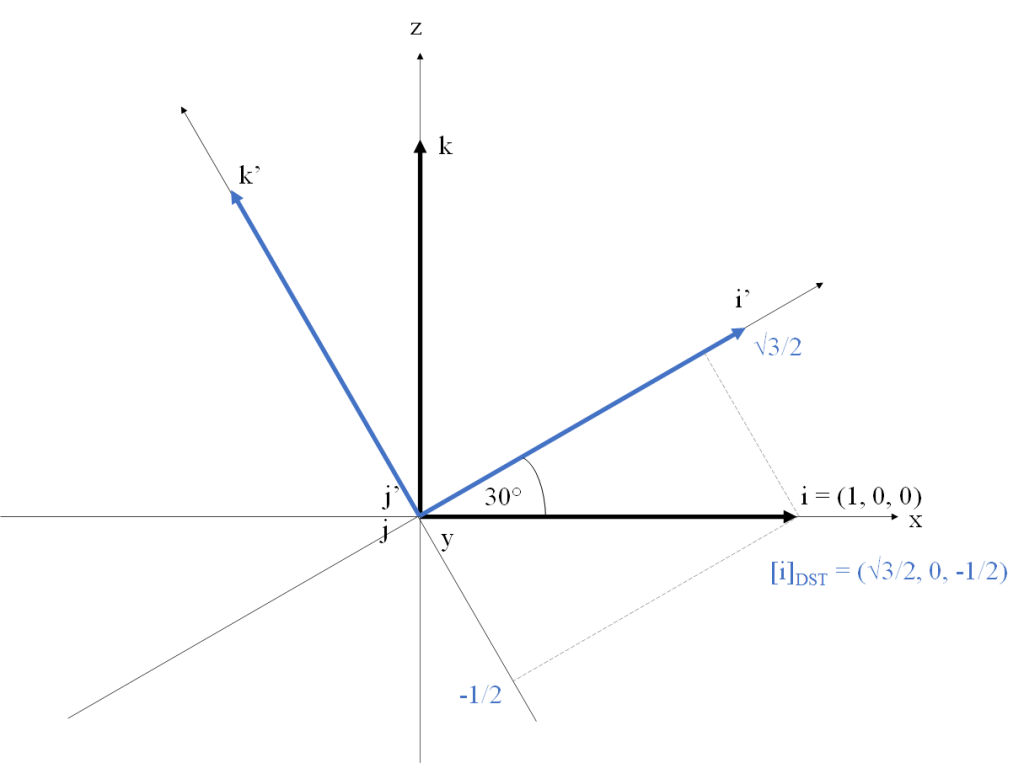
Say we want to compute the coordinates of i in DST. One way of doing it is to leave the vector i fixed, rotate the basis SRC so that it becomes DST and then project i onto the direction of the rotated basis vectors. The coordinates of i in DST, which we will denote as [i]_{DST}, are (\sqrt{3}/2, 0, -1/2). Figure 1 illustrates this approach. We are using a right-handed coordinate system (Y points into the screen). The vectors of the canonical basis SRC are represented as i, j, and k, show in black. The rotated vectors of DST are i', j' and k', shown in blue (note the j vector remains fixed due to the axis of the rotation being parallel to it).

Figure 1. Visualizing the coordinates of i in DST. The vector i is fixed and the basis is rotated counterclockwise

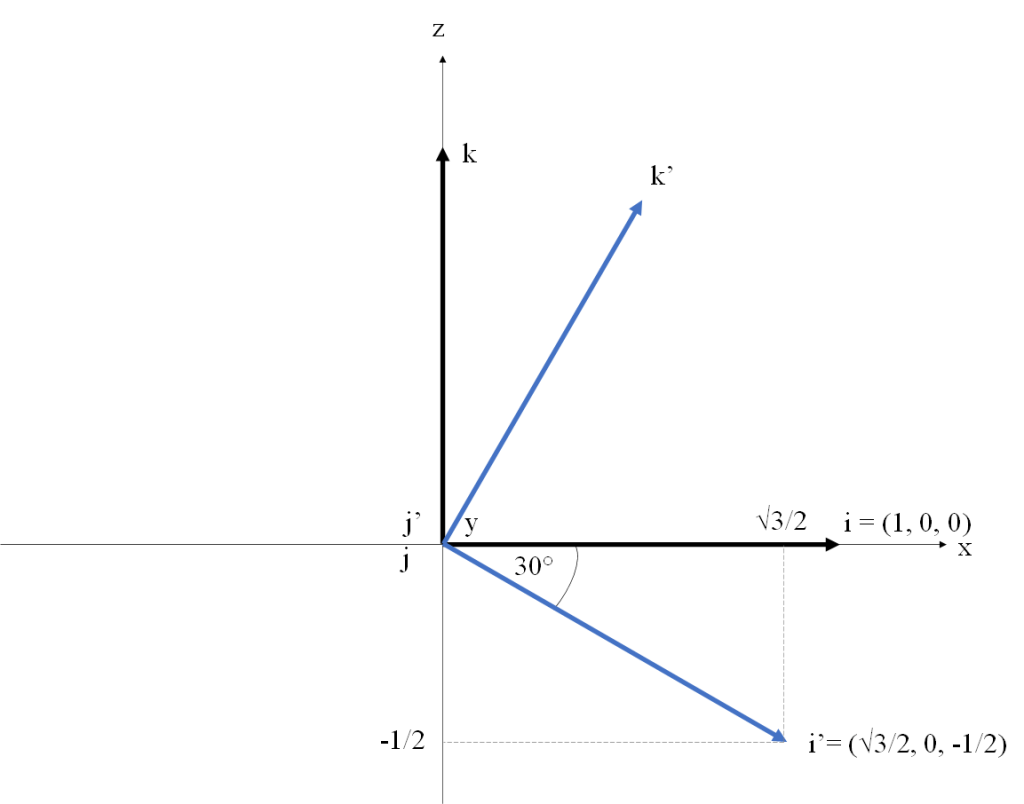
Alternatively, we can leave the basis fixed and rotate the vector i 30 degrees clockwise (i.e. applying the inverse of T). The coordinates we obtain are the same. Figure 2 illustrates this process.

Figure 2. The SRC basis is fixed and we rotate i clockwise.

Projection of a vector onto another vector

Given a vector space V and a vector a in V, the projection of a onto a nonzero vector b is the vector colinear with b that minimizes the length of a - b.

The projection of a onto b can be computed as (\frac{a . b}{|| b ||^2}) b.

This is related to the concept of coordinates. Given a base B = \{v_1, v_2, ..., v_n\} of V, the coordinates of a with respect to B are the \lambda_i = \frac{a . v_i}{|| v_i ||^2}.

An interesting special case is when all the v_i are of length 1. In that case the coefficients becomes simply \lambda_i = a . v_i.

Affine spaces and affine frames

The affine space is an algebraic structure that provides a natural abstraction to represent physical space. Informally, an affine space is an extension of a vector space where we add a set of points to distinguish them from vectors. The set of points doesn’t have an origin, and points cannot be added together, but a point can be added to a vector (sometimes called displacement vector) to yield another point which represents the translation of the point by the vector. Similarly, two points can be subtracted to give a displacement vector.

Given two affine spaces X and Z, a function f: X \rightarrow Z is an affine map if there exists a linear map m_f such that f(x) - f(y) = m_f(x - y) for all x, y in X. Affine maps are functions that preserve lines and parallelism, while not necessarily preserving lengths and angles. All linear maps can be seen as special cases of affine maps, but not all affine maps are linear maps, because affine maps are not constrained to map the origin to the origin.

The set of points of an affine space doesn’t have an origin. In order to describe the coordinates of a point, we must arbitrarily define a point as origin and describe the coordinates of the displacement vectors relative to that origin. An affine frame is composed of a point o that we call origin and a basis B = \{v_1, v_2, ..., v_n\} of the vector space.

Given a frame (o, v_1, v_2, ..., v_n) for each point p there is a unique set of coefficients \lambda_i such that:

p - o = \lambda_1v_1 + \lambda_2v_2 + ... + \lambda_nv_n

The \lambda_i are called the affine coordinates of p in the frame (o, v_1, v_2, ..., v_n).

Note that although the point set of an affine space doesn’t have the concept of an origin point, we can always arbitrarily choose an affine frame, and this allows us to represent any point by its coordinates in that frame.

For a more formal and detailed description of the concepts of affine space and affine frame, see Sources.

Homogeneous coordinates

For an in-depth description of homogeneous coordinates and how they work, see see Sources.

What follows are the key takeaways of the subject, without going into much formality.

Every affine map can be represented as the composition of a linear map and a translation.

An affine map from \mathbb{R}^3 \rightarrow \mathbb{R}^3 cannot be described by a 3×3 matrix, because it’s not a linear map (it has a translation component).

Homogeneous coordinates allow us to represent an affine map in \mathbb{R}^3 \rightarrow \mathbb{R}^3 as a 4×4 matrix.

Given an affine map f: \mathbb{R}^3 \rightarrow \mathbb{R}^3 which is a composition of linear map r and a translation t by a vector (t_x, t_y, t_z) (that is f = t ^ {\circ} r), f can be represented by a 4×4 matrix M. To compute the matrix M, let

R = \begin{pmatrix} R_{11} & R_{12} & R_{13} & 0\\ R_{21} & R_{22} & R_{23} & 0\\ R_{31} & R_{32} & R_{33} & 0\\ 0 & 0 & 0 & 1 \end{pmatrix}

(The upper-left components of R are taken from the associated matrix of r).

Let

T = \begin{pmatrix} 1 & 0 & 0 & t_x \\ 0 & 1 & 0 & t_y\\ 0 & 0 & 1 & t_z\\ 0 & 0 & 0 & 1 \end{pmatrix}

Then

M = T * R = \begin{pmatrix} R_{11} & R_{12} & R_{13} & t_x\\ R_{21} & R_{22} & R_{23} & t_y\\ R_{31} & R_{32} & R_{33} & t_z\\ 0 & 0 & 0 & 1 \end{pmatrix}

(Note R is applied first, then T).

In order to transform a point p = (x, y, z) by an affine map f, first we convert p to an \mathbb{R}^4 column vector in homogeneous coordinates p_h = (x, y, z, 1) (setting its w component to 1), compute the matrix-vector multiplication p_h' = (x', y', z', w) = M * p_h, then we convert p_h' back to \mathbb{R}^3 by dividing its first three components by the fourth: f(p) = (x'/w, y'/w, z'/w).

Define and be aware of your coordinate systems orientation

In order to build the view matrix, you will first need to choose the handedness of the world and view coordinate systems and the orientation of the camera in the view system. In theory, this choice is up to the programmer and doesn’t depend on the graphics API you are using. Graphics APIs don’t care about what coordinate systems you use for the world and view spaces. What they specify is the handedness and range of the Normalized Device Coordinate (NDC) system and the orientation of the camera in it. You are free to choose the model, world and view coordinate systems however you want as long as you build the model, view and projection matrices in such a way that the P * V * M matrix multiplication maps the object onto its desired position and the frustum into the NDC frustum of the API you are using.

In practice, there may be external factors that constrain this choice though. For example, if you are working with OpenGL you will probably use the GLM library and build the view matrix using the glm::lookAt() function. If you use GLM, the library already has the decision of world and view coordinate systems made for you: both systems are right-handed, with Y pointing up and the camera looking down the negative Z axis. Historically, this has been the standard in OpenGL, from the times of the deprecated GLU library and the gluLookAt() function that glm::lookAt() is based on. The OpenGL NDC system is left-handed, with X pointing right, Y pointing up and the camera looking up the positive Z axis. All three cordinates X, Y and X vary between -1 and 1. You may have noticed that this change from right-handed to left-handed when going from view space to NDC is inconsistent. This quirk is a historical holdover in OpenGL, and is usually worked around by building the projection matrix so that it flips the Z axis (glm::perspective() does this internally).

In DirectX the NDC system is left-handed, with X pointing right, Y pointing up, and the camera pointing up the positive Z axis. X and Y range from -1 to 1, while z ranges from 0 to 1. Regarding the world and view coordinate systems, the API provides utility functions for building the view matrix for either a left-handed or right-handed view system (these are the D3DXMatrixLookAtLH() and D3DXMatrixLookAtRH()). However, given that the NDC system is left-handed, it’s natural to make your world and view systems that way as well.

In the Vulkan API, the NDC system is defined differently than OpenGL in order to avoid the inconsistency of going from right-handed to left-handed: the NDC is right-handed, with X pointing right, Y pointing down and the camera looking up the positive Z axis. X and Y vary between -1 and 1, but Z varies between 0 and 1. Note how Y points down and not up as in OpenGL. You’re on your own regarding how to establish the other coordinate systems.

Without loss of generality and for convention only, for the rest of this post we will work with world and view coordinate systems which are both right-handed. Our view system will follow the historical OpenGL convention: X points right, Y points up and the camera looks down the negative Z axis.

The problem

Now we are ready to formally state the problem of building the view matrix. What we usually call world space is an affine space. We have a point in space which we establish as the origin for the vector space. We have a right-hand coordinate system where the X axis points east, the Y axis points up, and the Z axis points south. We have an affine frame fixed in this origin with the canonical basis as its basis (the world frame), and we describe points by their coordinates in this frame. These are the world coordinates of a point.

The camera’s position is defined by a point eye in world space. Its orientation can be described by an orthonormal basis \{right, up, back\} whose vectors are defined in world space and point right, up and back from the camera as their names imply. This defines another affine frame with its origin at eye and \{right, up, back\} as its basis. Let’s call this frame the view frame.

The job of the view matrix is to convert coordinates from the world frame to the view frame. This is an affine map, so we represent it with a 4×4 matrix. Our problem is: given the eye point, the point we want the camera to look at center, and an updir vector indicating which direction is up from the camera, find the matrix M that converts coordinates in the world frame to coordinates in the view frame. Note the vector updir is not necessarily a unit vector, and it is not necessarily normal to the vector center - eye which defines the camera’s direction. The purpose of updir is to define a plane together with the direction vector center - eye, which indirectly defines right as the normal to this plane.

Solution

The first thing we will need to do is compute the vectors \{right, up, back\} that make up the basis of the view frame. The back is easy to obtain by subtracing center from eye:

back = normalize(eye - center)

The back and updir vectors define a plane, and the right vector needs to be normal to that plane. So we can obtain right as the cross product of updir and back. Note updir is not necessarily a unit vector, so we need to normalize the result of the dot product.

right = normalize(updir \times back)

Having back and right, we compute up as the cross product of them:

up = normalize(back \times right)

It’s worth noting that the construction of the three vectors of the view base is the only step in this process that depends on the handedness of the world and view coordinate systems and the orientation of the camera in the view frame. If you are using OpenGL with glm::lookAt(), your view base will be \{right, up, back\}, because the Z axis of the view frame points back from the camera. If using DirectX with D3DXMatrixLookAtLH(), your view base will be \{right, up, forward\}, because the view frame is left-handed. Regardless of how you have chosen the coordinate systems, the procedure from this step onwards is the same regardless.

Now that we have the vectors of view frame, let’s go back to the definition of affine coordinates. Say that we have a point p expressed in the world frame and we want to compute its coordinates in the view frame. By the definition, we are looking for the coefficients \lambda_1, \lambda_2, \lambda_3 such that the displacement vector p - eye can be obtained as the linear combination \lambda_1 right  +\lambda_2 up + \lambda_3 back. So the first thing we need to do is compute the displacement vector p - eye. This is a translation by -eye, and its matrix is:

T = \begin{pmatrix} 1 & 0 & 0 & -eye_x \\ 0 & 1 & 0 & -eye_y\\ 0 & 0 & 1 & -eye_z\\ 0 & 0 & 0 & 1 \end{pmatrix}

Once we have that, we have the displacement vector expressed by its coordinates in the basis of the world frame. We need to convert it to coordinates in the basis of the view frame. This is a basis change, where our SRC basis is the canonical base, and our DST basis is \{right, up, back\}. Since SRC is the canonical base and DST is orthonormal, the change of basis matrix can be obtained simply by taking the vectors \{right, up, back\} and placing them as rows (see previous section on change of basis). So the change of basis matrix is:

R = \begin{pmatrix} right_x & right_y & right_z & 0 \\ up_x & up_y & up_z & 0 \\ back_x & back_y & back_z & 0 \\ 0 & 0 & 0 & 1 \end{pmatrix}

Now all we need is to combine the two steps:

M = R * T = \begin{pmatrix} right_x & right_y & right_z & -right . eye \\ up_x & up_y & up_z & -up . eye \\ back_x & back_y & back_z & -back . eye \\ 0 & 0 & 0 & 1 \end{pmatrix}

That’s it! It’s a translation to compute the displacement vector with respect to the camera eye point, followed by a change of basis from the canonical base to the \{right, up, back\} base. This is what the glm::lookAt() and D3DXMatrixLookAtLH() functions are doing internally.

Geometric interpretation of the lookAt() matrix

The following figure illustrates the coordinate conversion from the world frame to view frame. Following the previous argument, the geometric interpretation is that we are computing the vector p - eye expressed by its coordinates in the canonical base SRC, and then converting its coordinates to the base DST.

Figure 3. The p – eye vector is computed in SRC and then converted to DST

However, looking at the way the lookAt matrix is built, there’s an alternative geometric interpretation that we could make. Note that if we define the alternative translation matrix

T' = \begin{pmatrix} 1 & 0 & 0 & -right . eye \\ 0 & 1 & 0 & -up . eye \\ 0 & 0 & 1 & -back . eye \\ 0 & 0 & 0 & 1 \end{pmatrix}

Then the following matrix multiplication yields the same matrix M defined previously:

M = T' * R = \begin{pmatrix} right_x & right_y & right_z & -right . eye \\ up_x & up_y & up_z & -up . eye \\ back_x & back_y & back_z & -back . eye \\ 0 & 0 & 0 & 1 \end{pmatrix}

You can do the multiplication in a sheet of paper to confirm this. Note this is similar to the multiplication from before except that now we apply the linear component first, and translate afterwards using a different translation vector. What does this mean? Remember the geometric meaning of the dot product. When we compute the dot product of a vector a and a unit vector b, this gives us the coordinate of a over b. The translation T' is a translation by the vector (-right.eye, -up.eye, -back.eye), but this vector is nothing but the coordinates of -eye in the orthonormal base \{right, up, back\}. In other words, the expression T' * R is equivalent to converting the coordinates of the point p from SRC to DST, and then adding -eye expressed in DST. The result is the same displacement vector p - eye that we computed earlier, expressed in DST. The following figure illustrates this. It’s similar to the previous figure, but no we show -eye instead of eye.
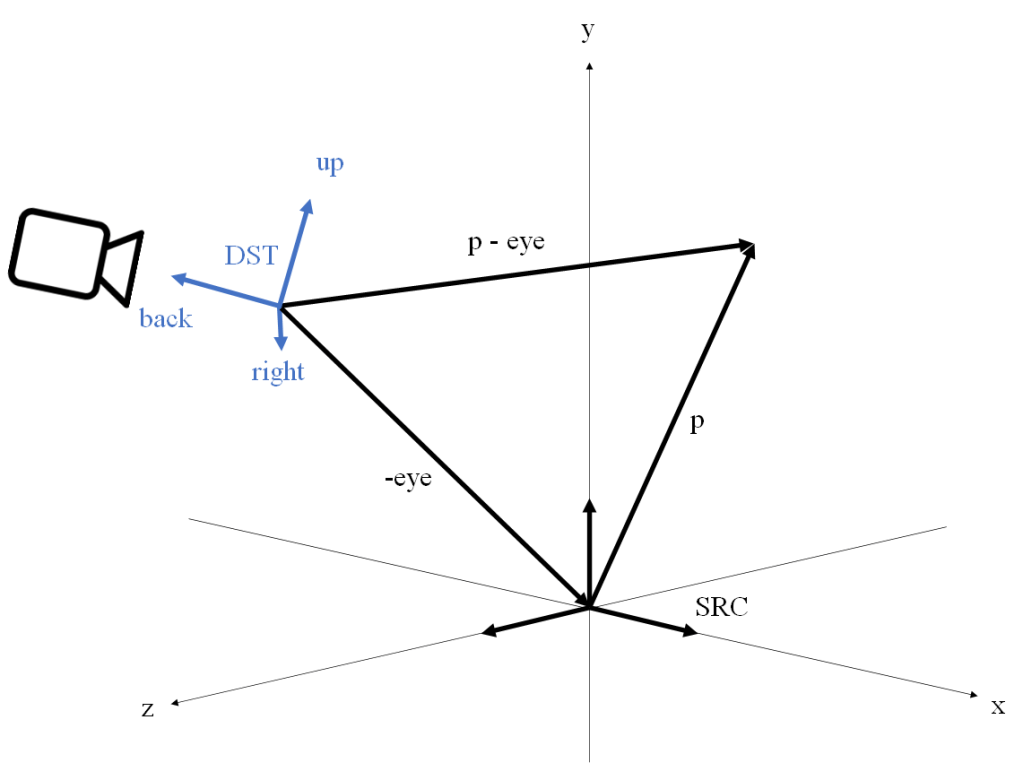
Figure 4. The -eye vector is converted to DST and then added to the DST-converted p to obtain p – eye in DST.

Sources

The PCI DSS Standard

Photo by Towfiqu barbhuiya on Unsplash

On this post we will present an introduction to the PCI DSS Standard, what it is, what constraints it imposes for organizations, and why it matters.

What is the PCI DSS?

The acronym stands for Payment Card Industry Data Security Standard. It is a set of rules for organizations involved in processing of online payments cards which constraints the way payment card data is stored and transferred, with the goal of protecting customer data.

All merchants looking to accept card payments must comply with the standard in order to operate in the industry.

You may have noticed that the expression PCI DSS Standard is redundant, since the last S of the acronym already stands for the word Standard. From now on we will refer to it simply as PCI DSS.

The PCI DSS is written and maintained by the PCI Security Standards Council (PCI SSC). According to their website, the council was was founded in 2006 by American Express, Discover, JCB International, Mastercard and Visa Inc. They share equally in ownership, governance, and execution of the Council’s work.

Who does the PCI DSS apply to?

The PCI DSS applies to all entities that process, store and / or transmit cardholder data.

Note that this means that even if an organization doesn’t store the data and only passes it along to an external provider, the organization must still comply with PCI DSS (although the compliance process would be greatly simplified in this case). This is still valid in particular if the data that the organization processes, stores and / or transmits is a token and not a clear credit card number (see below for the concept of token).

What does PCI DSS mean for merchants?

There are several reasons why complying with PCI DSS is beneficial for businesses:

  • To protect the data of your customers. Implementing good security practices reduces the likelihood and impact of a potential breach.
  • Many acquiring banks demand the merchant be PCI DSS compliant in order to process credit card payments for them.
  • Many acquiring banks apply a fine to non-compliant merchants.
  • If a breach happens, the business may receive fines and lawsuits from customers and other organizations. Fines may come for example from credit card networks or the government. Complying with PCI DSS helps reduce these fines.

Terminology

Before we can get into the standard requirements themselves, we need to lay down some terms:

Primary Account Number (PAN)

The credit card number visible on the front of the card.

According to the rules of the PCI DSS, the PAN can be stored but in that case it must be rendered unreadable via some mechanism like for example encryption or tokenization.

Cardholder data (CHD)

This category contains the following items:

  • Primary Account Number.
  • Cardholder Name.
  • Expiration Date.
  • Service Code.

Sensitive Authentication Data (SAD)

This term includes:

  • Card verification code, also known as Card Verification Value (CVV), Card Security Code (CSC).
  • Full track data (magnetic-stripe data or equivalent on a chip).
  • PINs/PIN blocks.

SAD like the CVV cannot be stored after the authorization completes, even if encrypted.

Cardholder Data Environment (CDE)

The people, processes and technology that store, process, or transmit cardholder data or sensitive authentication data, and any other systems that don’t but are on the same network as or have unrestricted connectivity to them.

Note the detail about unrestricted connectivity. A component that can connect to another component that stores, processes, or transmits CHD or SAD because there is a firewall rule that enables it is not part of the CDE. Such a component is part of what is called the connected-to systems (more on this below in the section about Scope).

It should be noted that systems outside of the CDE may still be relevant to a PCI DSS assessment, if they can connect to systems within the CDE (see concept of scope below).

Index Token

A non-sensitive replacement for the PAN, stored in a secure index that allows recovering the PAN (a sensitive value) from the token.

Scope

In the context of PCI DSS, the scope is the set of system components, people and processes that need to be included in the PCI DSS assessment. The first step of an assessment is to properly identify the scope of the review.

It’s important to understand that this doesn’t only involve the CDE. The PCI DSS scope is composed of:

  • The CDE.
  • Any system components with connectivity to or from the CDE. This category is sometimes referred to as “Connected-to” components.
  • Any system that can impact the security or configuration of the CDE (e.g. a host that cannot connect directly to the CDE but can access the CDE via a jump host). This category is sometimes referred to as “Security impacting” components.

Note that a workstation that cannot connect to the CDE but can log into it via a jump host (also known as bastion host) is not in the “Connected-to” category, but is still in the “Security impacting” components and therefore in scope.

Systems that while outside of the CDE have connectivity to or from the CDE or can impact the security of the CDE are impacted by PCI DSS and this need to be secured. It is common for attackers to target systems outside of the CDE which have been considered of low importance and use them to gain access to systems inside the CDE.

A note about alternative terminology. The components in the CDE are sometimes referred to as “Category 1”. The components in the “Connected-to” and the “Security impacting” groups are sometimes referred to as “Category 2” components, and components that are not in scope are also referred to as “Category 3”. The terms “Category 1”, “Category 2” and “Category 3” are not part of the standard but they are used in part of the literature.

The following figure illustrates the elements that compose the scope in PCI DSS:

Image by PCI SSC

PCI Compliance process

Given an organization that processes, stores or transmits cardholder data, the process for certifying as PCI compliant involves three main elements:

  • Handling the ingress and transmission of cardholder data securely.
  • Storing cardholder data securely, which involves complying with the 12 requirements of PCI DSS about aspects like encryption and security testing.
  • Doing annual validations that the required security controls are in place. This can include forms, questionnaires and / or external audits.

In the following sections we will present an overview of the steps involved in PCI compliance.

Step 1: Determine your requirements

The requirements of the PCI DSS vary depending on the scale of the organization. There are four different Compliance Levels:

  • Level 1: Merchants that annually process over 6 million transactions of Visa or Mastercard, or more than 2.5 million of American Express, or have experienced a data breach, or are considered Level 1 by any card network (e.g. Visa, Mastercard).
  • Level 2: Merchants that process 1 to 6 million transactions annually.
  • Level 3: Merchants that process 20,000 to 1 million online transactions annually, or that process less than 1 million total transactions annually.
  • Level 4: Merchants that process fewer than 20,000 online transactions annually, or that process up to 1 million total transactions annually.

Level 1 merchants require:

  • Annual Report on Compliance (ROC) by a Qualified Security Assessor (QSA) – also commonly known as a Level 1 onsite assessment – or internal auditor if signed by an officer of the company. The assessor works on site reviewing documentation artifacts, evaluating the scope of the assessment and providing support along the compliance process. The assessor submits the ROC to the organization’s acquiring banks indicating its compliance.
  • Quarterly network scan by Approved Scan Vendor (ASV).
  • Attestation of Compliance (AOC) for Onsite Assessments.

For organizations in levels 2 to 4, compliance requires:

In addition to the above, the PCI SSC updates the standard every three years and releases incremental updates throughout the year, which also contributes to the complexity of the process.

Step 2: Map your data flows

This step involves identifying every application or system component where CHD is processed, transmitted or stored. This may require creating new diagrams or design artifacts, showing details like which network connections carry clear credit card numbers, which carry only tokens and which carry neither of those things.

In other words, you delineate the PCI DSS scope.

This is team effort that requires collaboration across the organization.

Step 3: Check security controls and protocols

Once you have defined the scope, you need to check every system component in it to ensure the right security configurations and protocols are in effect according to the 12 requirements of the PCI DSS.

Step 4: Monitor and maintain compliance

Once you have achieved compliance with the standard, you will need to set up a regular process to monitor and ensure that you stay compliant across changes in the organization and the standard requirements.

Depending on the scale of the organization, this may involve submitting quarterly or annual reports, and may go as far as performing annual on-site assessments.

For more information about PCI compliance process, see Prioritized Approach for PCI DSS and FAQ about requirements for merchants that develop applications for consumer devices that accept payment card data..

Segmentation

Segmentation is the act of isolating the CDE from the rest of the organization’s network, for example via a firewall. Segmentation is not a requirement of PCI DSS, but it is strongly recommended to reduce the:

  • Scope of the PCI DSS assessment.
  • Cost of the PCI DSS assessment.
  • Complexity of implementing PCI DSS controls.
  • Risk of payment data compromise.

It’ s important to understand that if segmentation is not in place, the entire network is in scope for PCI DSS.

The separation of components into different networks is not enough to qualify as segmentation. Segmentation is achieved by having controls in place to enforce separation and preventing the out of scope network from being able to access CHD.

Segmentation example

As an example, consider the following problem, from Information Supplement: Guidance for PCI DSS Scoping and Network Segmentation:

  • Design a segmented network architecture that provides an administration workstation in the corporate LAN, that enables administrative access to the CDE while also keeping the rest of the corporate LAN out of the scope of PCI DSS.

A possible solution to this problem is illustrated by the following figure:

Image by PCI SSC

The solution consists of the following elements:

  • The system is segmented into three networks:
    • One network for the CDE (protected by a firewall).
    • One network for components that are unrelated to CHD processing (the corporate LAN).
    • One network for services which are used by both the corporate LAN and the CDE (the “shared services” network).
  • A “jumpbox” (also commonly referred to as bastion host) is installed in the shared services network.
  • Connection to the CDE from the corporate LAN is denied. Only the jump host can connect to the CDE.
  • Connections from the admin workstation to the jump host are only allowed for designated users.
  • (Other security controls required in order to comply with PCI DSS requirements, not shown here).

With the above setup, the PCI DSS scope consists of:

  • The CDE.
  • The shared services network.
  • The jump box.
  • The administration workstation.

All the other components within the corporate LAN are out of scope.

Tokenization and scope

It is clear that system components that handle PAN are part of the CDE. But what about components that only handle tokens? It depends: components that only handle tokens are considered outside the CDE as long as they are properly isolated from the CDE.

Note that even if a component that only handles tokens is outside of the CDE, that doesn’t mean that it is not in scope: it may still be in scope if it connects to a component in the CDE.

In general the use of tokenization is recommended as a way to reduce the scope and simplify the compliance process, but it does not eliminate the need to comply with PCI DSS. From, Information Supplement: PCI DSS Tokenization Guidelines:

“Tokenization solutions do not eliminate the need to maintain and validate PCI DSS compliance, but they may simplify a merchant’s validation efforts by reducing the number of system components for which PCI DSS requirements apply”.

PCI DSS and cache engines

If the set of components in scope include a cache service, we need to ensure that the cache is PCI DSS compliant. This makes the choice of cache engine relevant. This should be taken into account when designing the architecture of the system.

As an example, if we use one of the hosted cache solutions provided by the AWS Elasticache service, we have two choices of engine: Redis and Memcached. The Elasticache Redis service is PCI DSS compliant, whereas Elasticache Memached is not.

PCI DSS requirements

The following is a summary if the requirements that PCI DSS establishes. While we have included the 12 requirements, the details we mention for each are only an overview and should not be taken as an exhaustive description. For the detailed description see the actual PCI DSS test in the sources.

Requirement 1: Build and Maintain a Secure Network and Systems

This requirement consists of the following sections:

  • Processes and mechanisms for installing and maintaining network security controls are defined and understood.
  • Network security controls (NSCs) are configured and maintained.
  • Network access to and from the cardholder data environment is restricted.
  • Network connections between trusted and untrusted networks are controlled.
    • This involves among other things ensuring that the components where cardholder data is stored are not directly accessible from untrusted networks.
  • Risks to the CDE from computing devices that are able to connect to both untrusted networks and the CDE are mitigated.

Requirement 2: Apply Secure Configurations to All System Components

This requirement consists of the following sections:

  • Processes and mechanisms for applying secure configurations to all system components are defined and understood.
  • System components are configured and managed securely.
  • Wireless environments are configured and managed securely.

Example recommendations:

  • Change all default passwords.

Requirement 3: Protect Stored Account Data

This requirement consists of the following sections:

  • Processes and mechanisms for protecting stored account data are defined and understood.
    • Storage of account data is kept to a minimum.
  • Sensitive authentication data (SAD) is not stored after authorization.
    • For example the CVV of a credit card cannot be stored after the authorization has completed, even if encrypted.
    • SAD that is stored prior to completion of the authorization must be encrypted using strong cryptography.
    • Note the category of SAD contains the CVV, but not the PAN or the expiration date.
    • To the effects of this rule, the authorization is considered to be complete when the merchant receives a response (for example approval or decline).
  • Access to displays of full PAN and ability to copy cardholder data are restricted.
    • The PAN must be masked when displayed (such as in UI or logs). The BIN and the last four digits are the maximum number of digits than can be displayed.
  • Primary account number (PAN) is secured wherever it is stored.
    • PAN is rendered unreadable anywhere it is stored by using any of the following approaches:
      • One-way hashes based on strong cryptography of the entire PAN.
      • Truncation, as long as hashing cannot be used to replace the truncated segment of PAN.
        • If hashed and truncated versions of the same PAN, or different truncation formats of the same PAN, are present in an environment, additional controls must be in place such that the different versions cannot be correlated to reconstruct the original PAN.
      • Index tokens.
      • Strong cryptography with associated key management processes and procedures.
  • Cryptographic keys used to protect stored account data are secured.
  • Where cryptography is used to protect stored account data, key management processes and procedures covering all aspects of the key life cycle are defined and implemented.

Example recommendations:

  • Try to avoid storing the PAN if at all possible. If you must store it, it must be encrypted.
  • Try to avoid storing the CVV at all. If you must store it it can only be stored during the authorization and not after that.
  • Avoid putting PANs and CVVs in logs.

Requirement 4: Protect Cardholder Data with Strong Cryptography During Transmission Over Open, Public Networks

This requirement consists of the following sections:

  • Processes and mechanisms for protecting cardholder data with strong cryptography during transmission over open, public networks are defined and documented.
  • PAN is protected with strong cryptography during transmission.

Requirement 5: Protect All Systems and Networks from Malicious Software

This requirement consists of the following sections:

  • Processes and mechanisms for protecting all systems and networks from malicious software are defined and understood.
  • Malicious software (malware) is prevented, or detected and addressed.
  • Anti-malware mechanisms and processes are active, maintained, and monitored.
  • Anti-phishing mechanisms protect users against phishing attacks.

Requirement 6: Develop and Maintain Secure Systems and Software

This requirement consists of the following sections:

  • Processes and mechanisms for developing and maintaining secure systems and software are defined and understood.
  • Bespoke and custom software are developed securely.
    • This involves ensuring that software development personnel working on bespoke and custom software are trained at least once every 12 months.
    • Software goes through a code review process prior to being released into production or to customers, to identify and correct potential coding vulnerabilities.
  • Security vulnerabilities are identified and addressed.
    • This involves keeping an inventory of bespoke and custom software, and third-party software components incorporated into bespoke and custom software in order to facilitate vulnerability and patch management.
  • Public-facing web applications are protected against attacks.
    • This protection may be in the form of reviewing public-facing web applications with manual or automated application vulnerability security assessment tools at least every 12 months, or in the form of installing an automated solution in front of the public-facing web application that continually detects and prevents web-based attacks. A Web Application Firewall (WAF) is an example of the latter approach.
  • Changes to all system components are managed securely.
    • This involves ensuring that all changes in production are made following a process that documents the reason for the change, who approved it, how to rollback in case of failure, etc.
    • Pre-production environments must be separated from production environments and the separation must be enforced with access controls.
    • Live PANs are not used in pre-production environments, except where those environments are included in the CDE and protected in accordance with all applicable PCI DSS requirements.

Example recommendations:

  • If you use an Oracle database, ensure that any Critical Patch Updates are applied within 30 days.

Requirement 7: Restrict Access to System Components and Cardholder Data by Business Need to Know

This requirement consists of the following sections:

  • Processes and mechanisms for restricting access to system components and cardholder data by business need to know are defined and understood.
  • Access to system components and data is appropriately defined and assigned.
    • This involves reviewing all user accounts and related access privileges at least once every six months to ensure accesses remain appropriate based on job function.
    • User access to repositories of cardholder data must be restricted to ensure only the responsible administrators have access.
  • Access to system components and data is managed via an access control system(s).

Requirement 8: Identify Users and Authenticate Access to System Components

This requirement consists of the following sections:

  • Processes and mechanisms for identifying users and authenticating access to system components are defined and understood.
  • User identification and related accounts for users and administrators are strictly managed throughout an account’s lifecycle.
    • This involves ensuring that group, shared, or generic accounts, or other shared authentication credentials are only used when necessary on an exception basis.
    • Access for terminated users is immediately revoked.
    • Inactive accounts are removed or disabled within 90 days of inactivity.
  • Strong authentication for users and administrators is established and managed.
    • All user access to system components for users and administrators is authenticated via at least one of the following authentication factors:
      • Something you know, such as a password or passphrase.
      • Something you have, such as a token device or smart card.
      • Something you are, such as a biometric element.
    • Strong cryptography is used to render all authentication factors unreadable during transmission and storage on all system components.
    • If passwords are used, they are at least 12 characters in length and contain both numeric and alphabetic characters.
  • Multi-factor authentication (MFA) is implemented to secure access into the CDE.
    • MFA must be implemented for all access into the CDE.
  • Multi-factor authentication (MFA) systems are configured to prevent misuse.
    • MFA systems are implemented as follows:
      • The MFA system is not susceptible to replay attacks.
      • MFA systems cannot be bypassed by any users, including administrative users unless specifically documented, and authorized by management on an exception basis, for a limited time period.
      • At least two different types of authentication factors are used.
      • Success of all authentication factors is required before access is granted.
  • Use of application and system accounts and associated authentication factors is strictly managed.
    • Passwords/passphrases for any application and system accounts that can be used for interactive login are not hard coded in scripts, configuration/property files, or bespoke and custom source code.

Example recommendations:

  • If you use a relational database, no users with read-all access must exist.

Requirement 9: Restrict Physical Access to Cardholder Data

This requirement consists of the following sections:

  • Processes and mechanisms for restricting physical access to cardholder data are defined and understood.
  • Physical access controls manage entry into facilities and systems containing cardholder data.
    • Individual physical access to sensitive areas within the CDE is monitored with either video cameras or physical access control mechanisms.
    • Physical and/or logical controls are implemented to restrict use of publicly accessible network jacks within the facility.
    • Physical access to wireless access points, gateways, networking/communications hardware, and telecommunication lines within the facility is restricted.
  • Physical access for personnel and visitors is authorized and managed.
    • Visitors are escorted at all times.
    • Visitors are clearly identified and given a badge or other identification that expires.
    • Visitor badges or other identification visibly distinguishes visitors from personnel.
  • Media with cardholder data is securely stored, accessed, distributed, and destroyed.
    • The security of the offline media backup location(s) with cardholder data is reviewed at least once every 12 months.
    • Inventory logs of all electronic media with cardholder data are maintained.
    • Inventories of electronic media with cardholder data are conducted at least once every 12 months.
    • Hard-copy materials with cardholder data are destroyed when no longer needed for business or legal reasons.
    • Electronic media with cardholder data is destroyed when no longer needed for business or legal reasons.
  • Point of interaction (POI) devices are protected from tampering and unauthorized substitution.
    • A list of POI devices must be maintained.
    • POI devices must be inspected periodically to look for tampering or unauthorized substitution.

Requirement 10: Log and Monitor All Access to System Components and Cardholder Data

This requirement consists of the following sections:

  • Processes and mechanisms for logging and monitoring all access to system components and cardholder data are defined and documented.
  • Audit logs are implemented to support the detection of anomalies and suspicious activity, and the forensic analysis of events.
    • Audit logs capture all actions taken by any individual with administrative access, including any interactive use of application or system accounts.
    • Audit logs capture all invalid logical access attempts.
  • Audit logs are protected from destruction and unauthorized modifications.
    • Read access to audit logs files is limited to those with a job-related need.
    • Audit log files are protected to prevent modifications by individuals.
  • Audit logs are reviewed to identify anomalies or suspicious activity.
    • The following audit logs are reviewed at least once daily:
      • All security events.
      • Logs of all system components that store, process, or transmit CHD and/or SAD.
      • Logs of all critical system components.
      • Logs of all servers and system components that perform security functions (for example, network security controls, intrusion-detection systems/intrusion-prevention systems (IDS/IPS), authentication servers).
  • Audit log history is retained and available for analysis.
    • Retain audit log history for at least 12 months, with at least the most recent three months immediately available for analysis.
  • Time-synchronization mechanisms support consistent time settings across all systems.
    • System clocks and time are synchronized using time-synchronization technology (e.g. Network Time Protocol).
    • Time synchronization settings and data are protected as follows:
      • Access to time data is restricted to only personnel with a business need.
      • Any changes to time settings on critical systems are logged, monitored, and reviewed.
  • Failures of critical security control systems are detected, reported, and responded to promptly.
    • The following are examples of critical security control systems:
      • Network security controls.
      • Intrusion Detection Systems / Intrusion Prevention Systems.
      • Anti-malware solutions.
      • Physical access controls.
      • Audit logging mechanisms.
      • Audit log review mechanisms.
      • Automated security testing tools (if used).

Requirement 11: Test Security of Systems and Networks Regularly

This requirement consists of the following sections:

  • Processes and mechanisms for regularly testing security of systems and networks are defined and understood.
  • Wireless access points are identified and monitored, and unauthorized wireless access points are addressed.
    • An inventory of authorized wireless access points is maintained, including a documented business justification.
  • External and internal vulnerabilities are regularly identified, prioritized, and addressed.
    • Internal vulnerability scans are performed at least once every three months.
    • External vulnerability scans are performed at least once every three months by a PCI SSC-approved scanning vendor.
  • External and internal penetration testing is regularly performed, and exploitable vulnerabilities and security weaknesses are corrected.
    • Internal penetration testing is performed at least once every twelve months.
    • External penetration testing is performed at least once every twelve months.
  • Network intrusions and unexpected file changes are detected and responded to.
    • All traffic is monitored at the perimeter of the CDE.
    • All traffic is monitored at critical points in the CDE.
    • A change-detection mechanism (for example, file integrity monitoring tools) is deployed to alert personnel to unauthorized modification of critical files and to perform critical file comparisons at least once weekly.
  • Unauthorized changes on payment pages are detected and responded to.
    • A change- and tamper-detection mechanism is deployed to alert personnel to unauthorized modification (including indicators of compromise, changes, additions, and deletions) to the HTTP headers and the contents of payment pages as received by the consumer browser.

Requirement 12: Support Information Security with Organizational Policies and Programs

This requirement consists of the following sections:

  • A comprehensive information security policy that governs and provides direction for protection of the entity’s information assets is known and current.
  • Acceptable use policies for end-user technologies are defined and implemented.
    • These policies instruct personnel on what they can and cannot do with company equipment and instruct personnel on correct and incorrect uses of company Internet and email resources.
  • Risks to the cardholder data environment are formally identified, evaluated, and managed.
    • Cryptographic cipher suites and protocols in use are documented and reviewed at least once every 12 months.
  • PCI DSS compliance is managed.
  • PCI DSS scope is documented and validated.
    • An inventory of system components that are in scope for PCI DSS, including a description of function/use, is maintained and kept current.
    • PCI DSS scope is documented and confirmed by the entity at least once every 12 months and upon significant change to the in-scope environment.
  • Security awareness education is an ongoing activity.
    • A formal security awareness program is implemented to make all personnel aware of the entity’s information security policy and procedures, and their role in protecting the cardholder data.
    • Personnel receive security awareness training upon hire and at least once every 12 months.
  • Personnel are screened to reduce risks from insider threats.
  • Risk to information assets associated with third-party service provider (TPSP) relationships is managed.
    • A list of all third-party service providers (TPSPs) with which account data is shared or that could affect the security of account data is maintained, including a description for each of the services provided.
    • A program is implemented to monitor TPSPs’ PCI DSS compliance status at least once every 12 months.
  • Third-party service providers (TPSPs) support their customers’ PCI DSS compliance.
    • TPSPs support their customers’ requests for information by providing the following upon customer request:
      • PCI DSS compliance status information for any service the TPSP performs on behalf of customers.
      • Information about which PCI DSS requirements are the responsibility of the TPSP and which are the responsibility of the customer, including any shared responsibilities.
  • Suspected and confirmed security incidents that could impact the CDE are responded to immediately.
    • An incident response plan exists and is ready to be activated in the event of a suspected or confirmed security incident.
    • Specific personnel are designated to be available on a 24/7 basis to respond to suspected or confirmed security incidents.
    • Personnel responsible for responding to suspected and confirmed security incidents are appropriately and periodically trained on their incident response responsibilities.

Sources

Notes on using UUIDs as primary keys on databases

Photo by benjamin lehman on Unsplash

Problem

Given a table in a relational database, we want a way to generate the values we are going to use as primary keys on it.

Using a sequential integer is a common solution for this. In this post we want to consider an alternative approach: random UUIDs as primary keys.

Deciding between these two options (integers and UUIDs) is a non-trivial decision with several trade offs involved.

What is a UUID?

The term UUID refers to a Universally Unique Identifier. It is also called GUID (Globally Unique Identifier) in some contexts. This is a standard defined in RFC 4122 which defines a UUID as 128-bit integer that is displayed as a UTF-8 encoded string with the following format:

aaaaaaaa-bbbb-cccc-dddd-eeeeeeeeeeee

A simple solution to the problem of identifying records on a table is using an incremental integer. This is simple and allows for efficient ordering of the values in an index. However this approach has a drawback: in order to insert a record one needs to either know a value that is not already present in the table (which creates the new problem of how to obtain this value), or let the database generate a new value automatically in the insertion, which means that we don’t know the value until after the insertion has completed.

Pros

  • You can know your PK before insertion, which avoids a round trip DB hit, and simplifies transactional logic in which you need to know the PK before inserting child records using that key as its foreign key (FK).
  • At scale, when you have multiple databases containing a segment (shard) of your data, for example a set of customers, using a UUID means that one ID is unique across all databases, not just the one you’re in now. This makes moving data across databases safe.
  • Security: UUID values do not expose the information about your data so they are safer to use in a URL. For example, if a customer with id 10 accesses his account via http://www.example.com/customers/10/ URL, it is easy to guess that there is a customer 11, 12, etc., and this could be a target for an attack.

Cons

  • Performance: UUIDs as four times larger than a 4 byte integer. Using UUID values may cause performance issues due to their size and not being ordered. This is particularly troublesome in complex database schemas with several one-to-many and many-to-many relations that need joins and sorts to work with. The performance impact of having to store the larger keys in memory tends to add up. The significance of this aspect needs to be evaluated by the engineer on a case-by-case basis.
  • Storage size: storing UUID values (16-bytes) takes more storage than integers (4-bytes) or even big integers(8-bytes).

Best practices when using UUIDs

Regardless of the approach you take regarding your primary keys, it’s a good idea to adhere to the following principles:

  • Avoid exposing UUIDs in an browser-facing URL. Even if the UUID is not a primary key in the database but a an indirect reference to a record, exposing it provides information that may be exploited by an attacker.
  • If you use UUIDs as primary keys, avoid storing them as strings (VARCHAR). Instead, use the mechanism provided by your DBMS to store the UUID in binary. For example, in MySQL you can store the UUID as BINARY(16) , use the function UUID_TO_BIN to store it and use the function BIN_TO_UUID to retrieve it.
  • If you use UUIDs as primary keys, make sure that when records are inserted, they key is generated as a random value. Sequential values (such as generated by SQLServer’s newsequentialid) expose too much information about the underlying data.
  • Tom Harrison’s blog post on the matter suggests using UUIDs as primary keys, but without exposing them outside the service. This means your service’s API would use a different, external identifier for the entities, and the service needs to translate from the external identifiers to your internal UUID primary keys.

Sources

How to secure the graceful shutdown of a Spring Boot application running on AWS EC2 instance

Photo by Steve Johnson on Unsplash

Problem

We want to have a way to automatically instruct a Spring Boot application to do a graceful shutdown. This is useful for example when we use CodeDeploy to deploy the application to an EC2 instance, because it allows us to let the application shutdown gracefully when we are deploying a new version.

Assumptions

For the remainder of this text we will work on the following assumptions:

  1. The application is a Spring Boot application.
  2. The application is deployed on an EC2 instance using AWS CodeDeploy (which involves custom start and stop scripts) but the stop script calls the shutdown endpoint in an insecure way over HTTP (not HTTPS). See previous post Setting up a simple CICD pipeline with AWS CodePipeline for instructions on how to set this up.
  3. The credentials for graceful shutdown will be stored in AWS Secrets Manager.

Steps

Follow these instructions to automate the graceful shutdown.

  • Configure HTTP basic authentication for all the endpoints under /actuator, following the instructions at How to secure an API endpoint with HTTP basic authentication in Spring Boot .
  • I you haven’t configured the AWS CLI locally and on the EC2 instance, do it following the instructions at How to configure the AWS CLI.
  • This is necessary so that the shutdown script can retrieve the password for the shutdown endpoint from AWS Secrets Manager.
  • Edit the start script so that:
    • The delay between the command where the application is started and the command where you check if the application started ok is long enough taking into account the time the application needs in order to read the admin password from the secret management service.
  • Edit the shutdown script so that:
    • It retrieves the admin password from the secret management service and passess it in the curl call to the shutdown endpoint.
    • It doesn’t use the -v option in the curl call, so that the credentials base64 string doesn’t appear in the output
    • It calls the actuator/shutdown endoint with https and not http.
    • If your application uses a self-signed certificate, make sure that the shutdown script calls curl with the option -k, so that curl accepts the self-signed certificate from our application.
  • The following is an example of a viable stop script updated to read the admin password from AWS Secrets Manager and sending it in the request to the /actuator/shutdown endpoint:
#! /bin/bash

SERVICE_HOST=localhost
SERVICE_PORT=8080
ADMIN_PASSWORD_SECRET_NAME=<the_admin_password_secret_name>

pid=`ps aux | grep -i <my_app_name> | grep -v grep | awk '{ print $2 }'`
if [ ! $pid ]; then
  echo "Process not runing, nothing to do"
  exit 0
fi

ADMIN_PASSWORD_JSON=`aws secretsmanager get-secret-value --secret-id $ADMIN_PASSWORD_SECRET_NAME`
if [ ! $? -eq 0 ]; then
  echo "Could not retrieve admin password from AWS Secrets Manager. Check that aws configure has been ran in the host. The service will remain running"
  exit 1
fi

ADMIN_PASSWORD=`echo "$ADMIN_PASSWORD_JSON" | jq -r '.SecretString'`
if [ ! $? -eq 0 ]; then
  echo "Could not parse the admin password from the AWS Secrets Manager json response. Check that jq is installed in the host. The service will remain running"
  exit 1
fi

echo "Sending shutdown request to service..."
curl -k -X POST --user "admin:$ADMIN_PASSWORD" https://$SERVICE_HOST:$SERVICE_PORT/actuator/shutdown
curl_result=$?
echo -ne "\n"

if [ ! $curl_result -eq 0 ]; then
  echo "Could not do the graceful shutdown of the service. This may mean that we couldn't send the shutdown request, or that the admin password we retrieved from AWS Secrets Manager doesn't match what the service is expecting. We will kill the process anyway"
  echo "Curl exit code: $curl_result"
fi

kill $pid
kill_result=$?
if [ ! $kill_result -eq 0 ]; then
  echo "Could not kill process. You should kill it manually"
  echo "Kill exit code: $kill_result"
  exit 1
fi

echo "Service stopped"
  • Edit the application.properties so that it has:
management.endpoints.web.exposure.include=*
management.endpoint.shutdown.enabled=true
  • This is all that is needed (and the first line is optional to the effects of enabling shutdown).
  • (One time only per EC2 instance) Install the jq tool in the EC2 instance, with the following command:
$ sudo yum install jq
  • This is necessary because the stop script above needs to use jq to parse the AWS Secrets Manager json response.

How to secure an API endpoint with HTTP basic authentication in Spring Boot

Photo by Ash from Modern Afflatus on Unsplash

Problem

Given a Spring Boot application that exposes a REST API, we want to control access to one of its API endpoints using HTTP basic authentication.

HTTP basic authentication

HTTP basic authentication is an extension to the HTTP protocol meant to protect access to a web resource. It works defining a username and password for the resource, and having the client send a header Authorization: Basic <credentials>, where credentials is the string username:password encoded in base64. For more details see https://en.wikipedia.org/wiki/Basic_access_authentication.

Assumptions

We will work based on the following assumptions:

  1. The application is a Spring Boot web application that uses the reactive web stack (Webflux). This means the approach of using SecurityWebFilterChain to configure security for each endpoint is not an option, because it depends on the blocking servlets API so can’t be used in a reactive service.
  2. The credentials will be stored on the cloud using AWS Secrets Manager.
  3. The application has a set of endpoints that are able to receive unsecured requests over HTTP, and these endpoints are under the URL /api/.

Steps

Follow this procedure to protect an endpoint with HTTP basic authentication. assumes the application is a Spring Boot web application that uses the reactive web stack.

  • If you haven’t added the AWS Secrets Manager Java SDK to your project, do it following the instructions at How to integrate a Java application with the AWS Java SDK .
  • If you haven’t configured the application to use SSL to receive its requests, do it following the instructions at Setting up HTTPS / SSL in a Spring Boot application .
    • This is necessary in order to send the credentials securely in the HTTP request. Keep in mind the credentials are sent encoded in base64, but base64 is not encryption. Any third party that intercepts the request in cleartext could easily extract the credentials from the base64-encoded string.
  • Create a strong password to protect the endpoint.
  • Store this password in AWS Secrets Manager following the instructions at Working with AWS Secrets Manager .
  • Create a bean (let’s call it APIPasswordRetriever for this example) that retrieves the API password from the secret management service following the instructions at Working with AWS Secrets Manager .
  • Pick a username to use to access the API. In this example we will use “api-user’.
  • Add the following dependencies to your project:
<dependency>
    <groupId>org.springframework.boot</groupId>
    <artifactId>spring-boot-starter-security</artifactId>
</dependency>
<dependency>
    <groupId>org.springframework.security</groupId>
    <artifactId>spring-security-test</artifactId>
    <scope>test</scope>
</dependency>
  • If your pom inherits from the spring-boot-starter-parent parent, you don’t need to specify the versions. Otherwise, search for the latest versions in https://search.maven.org/classic/.
  • Create a bean of type SecurityWebFilterChain, and construct it using the ServerHttpSecurity builder. You can use the following snippet as guidance:
import org.springframework.security.authentication.UserDetailsRepositoryReactiveAuthenticationManager;
import org.springframework.security.web.server.util.matcher.ServerWebExchangeMatchers;
import org.springframework.security.core.userdetails.MapReactiveUserDetailsService;
import org.springframework.security.config.web.server.ServerHttpSecurity;
import org.springframework.security.crypto.bcrypt.BCryptPasswordEncoder;
import org.springframework.security.web.server.SecurityWebFilterChain;
import org.springframework.security.crypto.password.PasswordEncoder;
import org.springframework.security.core.userdetails.UserDetails;
import org.springframework.beans.factory.annotation.Autowired;
import org.springframework.context.annotation.Configuration;
import org.springframework.security.core.userdetails.User;
import org.springframework.beans.factory.annotation.Value;
import org.springframework.context.annotation.Bean;

@Configuration
public class ApiSecurityConfig {

    @Autowired
    private APIPasswordRetriever apiPasswordRetriever;

    @Bean
    public SecurityWebFilterChain apiSecurityWebFilterChain(ServerHttpSecurity http) {
        PasswordEncoder passwordEncoder = new BCryptPasswordEncoder();

        UserDetails user = User
            .withUsername("api-user")
            .password(passwordEncoder.encode(apiPasswordRetriever.getApiPassword()))
            .roles("API_USER")
            .build();

        MapReactiveUserDetailsService userDetailsService = new MapReactiveUserDetailsService(user);

        UserDetailsRepositoryReactiveAuthenticationManager authManager =
            new UserDetailsRepositoryReactiveAuthenticationManager(userDetailsService);
        authManager.setPasswordEncoder(passwordEncoder);

        return http
            .csrf().disable()
            .securityMatcher(ServerWebExchangeMatchers.pathMatchers("/api/**"))
            .httpBasic()
            .and()
            .authorizeExchange()
            .pathMatchers("/api/**")
            .hasRole("API_USER")
            .and()
            .authenticationManager(authManager)
            .build();
    }
}
  • Key takeaways:
    • The securityMatcher line specifies the scope of this configuration i.e. which requests it will act upon. Using this approach, you can set up different security settings for different APIs, by creating different SecurityWebFilterChain beans. As long as the securityMatcher lines define disjoint paths, the configurations will not step on each other. If we didn’t include the securityMatcher line, then this SecurityWebFilterChain config would apply to all requests.
    • The pathMatchers line is used to enter into authorization settings for a given URL within that scope. Several pathMatchers lines can be given to configure different URLs.
    • The above configuration enables HTTP basic authentication for all URLs under /api.
    • The role used is an arbitrary string, all that matters is that it matches between the creation of the user database (line .roles("API_USER")) and the hasRole("API_USER") line.
    • We disable CSRF protection. It’s not really applicable in a REST service, which is not browser-facing. Disabling CSRF protection in necessary for POST requests to work without having to send a CSRF token.

Sources

Setting up HTTPS / SSL in a Spring Boot Web application

Photo by Georg Bommeli on Unsplash

Problem

We want to be able to exchange HTTP requests and responses with our application over an encrypted connection.

HTTPS and SSL

SSL (Secure Sockets Layer) is a standard for secure communication over the transport layer. It defines a set of protocols and algorithms via which a client can establish an encrypted communication channel to a server by a process called SSL Handshake. The SSL standard has been superseded by a newer specification called TLS (Transport Layer Security). For the rest of this text we will use the terms SSL and TLS interchangeably, as is common in a large part of the literature.

HTTPS (Hypertext Transfer Protocol Secure) is an updated version of the HTTP protocol that works over an SSL connection.

The following sections describe how to enable a Spring Boot application to receive requests and provide responses over SSL.

Server setup

  • First, we will create a a file called keystore which will contain the public key, public key certificate and private key for the server.
  • Choose a strong password to use to encrypt the keystore file.
  • Store the keystore password in some secret management service, e.g. AWS Secrets Manager. In the following steps, we asume you are using AWS Secrets Manager to store the secrets.
  • If you haven’t added the AWS Secrets Manager Java SDK to your project, do it now following the steps at Working with AWS Secrets Manager .
  • Create a bean in your service that, in its initialization, connects to the secret management service and retrieves the password. You can find an example of how to do this in Working with AWS Secrets Manager .
  • Create the keystore file with this command:
keytool -genkeypair -alias <key_store_alias> -keyalg RSA -keysize 2048 -storetype PKCS12 -keystore <key_store_file_name>.p12 -validity 3650

When it asks for the name of the server, enter localhost:

What is your first and last name?
    [Unknown]: localhost

This is important in order to be able to connect to the server using the hostname localhost, otherwise the hostname verification (which is part of HTTPS) will fail. Note: supposedly there is a way in Spring Webflux to disable hostname verification programmatically (see this StackOverflow question). However when I tried it, it didn’t work because the matches() method was never called. If you find a way to disable hostname verification in Webflux that works, let me know.

If you run the keytool command more than once to regenerate the keys, keep in mind that you will need to rebuild the server’s jar every time in order for the change to take effect.

  • Export the server’s public key certificate from the keystore file, so that it can be added in the client’s CA collection:
$ keytool -exportcert -rfc -keystore <key_store_file_name>.p12 -storetype PKCS12  -alias <key_store_alias> -file <server_public_key_file_name>-pub.crt
  • Add the keystore file to the application’s repo, in a suitable subdirectory within the resources folder.
  • Use the following snippet to create the ServerProperties bean with a factory method, and inside this method, set the keystore password using the bean that reads it from the secret management service (see Working with AWS Secrets Manager for a tutorial on how to create the bean the reads the keystore password from your secret management service):
import org.springframework.boot.autoconfigure.web.ServerProperties;
import org.springframework.beans.factory.annotation.Autowired;
import org.springframework.context.annotation.Configuration;
import org.springframework.context.annotation.Bean;
import org.springframework.boot.web.server.Ssl;

@Configuration
public class SSLConfig {

    @Autowired
    private KeyStorePasswordRetriever keyStorePasswordRetriever;

    @Bean
    public ServerProperties serverProperties() {
        Ssl ssl = new Ssl();
        ssl.setKeyStorePassword(keyStorePasswordRetriever.getKeyStorePassword());
        ServerProperties serverProperties = new ServerProperties();
        serverProperties.setSsl(ssl);
        return serverProperties;
    }
}
  • Add the following to your application.properties:
# The format used for the keystore. It could be set to JKS in case it is a JKS file
server.ssl.key-store-type=PKCS12
# The path to the keystore containing the certificate e.g. classpath:com/sgonzalez/myservice/myservice-ssl-keystore.p12
server.ssl.key-store=classpath:<path_to_your_keystore.p12_file_in_your_classpath> 
# The alias mapped to the certificate
server.ssl.key-alias=<myservice-ssl-keystore.p12>
# Configure Spring Security to accept only HTTPS requests:
server.ssl.enabled=true

Client setup

For every client that needs to connect to the application, do the following (we assume here that the client is also a Spring-based Java application):

  • Add this in the application.properties:
# The server's hostname (needs to match the name entered when creating the server's keystore)
serverHost=localhost
# The server's port number
serverPort=9000
# Connection timeout
serverConnectionTimeoutMillis=200
# TCP read timeout
serverReadTimeoutMillis=2400
# TCP write timeout
serverWriteTimeoutMillis=400
  • Configure the WebClient bean in the following way (this assumes the client is a Java Spring Boot application using Spring Webflux and Reactor Netty as container):
@Configuration
class MyClientConfiguration {

    @Value("${serverHost}")
    private String host;

    @Value("${serverPort}")
    private int port;

    @Value("${serverConnectionTimeoutMillis}")
    private int connectionTimeoutMillis;

    @Value("${serverReadTimeoutMillis}")
    private int readTimeoutMillis;

    @Value("${serverWriteTimeoutMillis}")
    private int writeTimeoutMillis;

    @Bean
    WebClient myWebClient() throws IOException {
        SslContext context = SslContextBuilder
            .forClient()
            .trustManager(new ClassPathResource("<public_key_certificate_file_name>-pub.crt", this.getClass()).getInputStream())
            .build();

        TcpClient tcpClient = TcpClient
            .create()
            .option(ChannelOption.CONNECT_TIMEOUT_MILLIS, connectionTimeoutMillis)
            .doOnConnected(connection -> {
                connection.addHandlerLast(new ReadTimeoutHandler(readTimeoutMillis, TimeUnit.MILLISECONDS));
                connection.addHandlerLast(new WriteTimeoutHandler(writeTimeoutMillis, TimeUnit.MILLISECONDS));
            });

        HttpClient httpClient = HttpClient
            .from(tcpClient)
            .secure(sslContextSpec -> sslContextSpec
                .sslContext(context));

        return WebClient
            .builder()
            .baseUrl(String.format("https://%s:%d", host, port))
            .clientConnector(new ReactorClientHttpConnector(httpClient))
            .build();
    }
}

Troubleshooting notes

  • To attempt an SSL handshake to the locally running server (shows all certificates involved):
$ openssl s_client -connect localhost:9000
  • To check a certificate file in PEM format
$ openssl x509 -in myservice-pub.crt -text -noout
  • To check a certificate file in P12 format (you’ll have to enter the keystore password)
openssl pkcs12 -info -in keyStore.p12

Sources

Logging configuration in Spring Boot

Photo by Clay Banks on Unsplash

Problem

Spring Boot creates a default logging infrastructure with SLFJ as an abstraction layer over Logback. This works, but the default configuration logs with debug level and is overly verbose when using other libraries like JDBC and WebClient. We want to configure the log level with a configuration file to show the logs of our application and reduce library logs to errors or warnings.

Option 1: using Logback (recommended)

Since Logback is the logging framework that Spring Boot configures by default, this option is the simplest and should be preferred unless you have a reason to use a different logging system.

It’s worth noting that Spring Boot uses a Logback configuration that formats the logs in columns, which is not Logback’s default. It is desirable to keep this feature when we set up our own configuration, so our custom configuration is based on Spring’s (specifically the formatting part), with some tweaks for the level.

To configure Logback for use by the application and its unit tests, follow thes steps:

  • Create a file named logback.xml in src/main/resources with the following content:
<configuration>
    <!--
      The patterns used here are copied from Spring Boot's default Logback configuration which is available at
      https://github.com/spring-projects/spring-boot/blob/v2.4.0/spring-boot-project/spring-boot/src/main/resources/org/springframework/boot/logging/logback/base.xml
    -->
    <conversionRule conversionWord="clr" converterClass="org.springframework.boot.logging.logback.ColorConverter" />
    <conversionRule conversionWord="wex" converterClass="org.springframework.boot.logging.logback.WhitespaceThrowableProxyConverter" />
    <conversionRule conversionWord="wEx" converterClass="org.springframework.boot.logging.logback.ExtendedWhitespaceThrowableProxyConverter" />

    <property name="CONSOLE_LOG_PATTERN" value="${CONSOLE_LOG_PATTERN:-%clr(%d{${LOG_DATEFORMAT_PATTERN:-yyyy-MM-dd HH:mm:ss.SSS}}){faint} %clr(${LOG_LEVEL_PATTERN:-%5p}) %clr(${PID:- }){magenta} %clr(---){faint} %clr([%15.15t]){faint} %clr(%-40.40logger{39}){cyan} %clr(:){faint} %m%n${LOG_EXCEPTION_CONVERSION_WORD:-%wEx}}"/>
    <property name="CONSOLE_LOG_CHARSET" value="${CONSOLE_LOG_CHARSET:-default}"/>
    <property name="LOG_FILE" value="${LOG_FILE:-${LOG_PATH:-${LOG_TEMP:-${java.io.tmpdir:-/tmp}}}/spring.log}"/>
    <appender name="CONSOLE" class="ch.qos.logback.core.ConsoleAppender">
        <encoder>
            <pattern>${CONSOLE_LOG_PATTERN}</pattern>
            <charset>${CONSOLE_LOG_CHARSET}</charset>
        </encoder>
    </appender>
    <logger name="<base_package>" level="info"/>
    <root level="warn">
        <appender-ref ref="CONSOLE" />
    </root>
</configuration>
  • Replace <base_package> for the name of some package in your application that is high enough in the package hierarchy that all packages in your application are under it.
  • All loggers that aren’t created by our application code (such as those created by external libraries) will inherit the configuration of the root logger, which we have set to level warning in our configuration.
  • All the loggers created by our application code will inherit the configuration of the logger we have defined in the file above, tied to package <base_package>. This is why this package needed to be high in the package hierarchy.
  • That’s it. When you run the application and when your run tests, Logback will detect this file and use it. Note it’s not necessary to create a separate logback-test.xml file for unit tests. Maven automatically copies the logback.xml to the target folder and uses it when running tests, and it also includes it in the jar that the application runs from.

Option 2: using Log4J

  • To configure the log level of Log4J with a properties file, you need to use log4J 2.4 onwards. In a Spring Boot project, you will probably be using the spring-boot-starter as parent. This starter depends on spring-boot-starter-logging, which uses logback. So in order to use Log4J 2.4 we will need to exclude the dependency on spring-boot-starter-logging.
  • Use the following command to get your project’s dependency tree and find out which of your dependencies is bringing logback into the project:
mvn dependency:tree -Dverbose
  • Edit your pom, putting the following text inside that dependency:
<exclusions>
    <exclusion>
        <groupId>org.springframework.boot</groupId>
        <artifactId>spring-boot-starter-logging</artifactId>
    </exclusion>
</exclusions>
  • Add the following dependencies to your pom:
<dependency>
    <groupId>org.apache.logging.log4j</groupId>
    <artifactId>log4j-api</artifactId>
    <version>2.5</version>
</dependency>
<dependency>
    <groupId>org.apache.logging.log4j</groupId>
    <artifactId>log4j-core</artifactId>
    <version>2.5</version>
</dependency>
<dependency>
    <groupId>org.slf4j</groupId>
    <artifactId>slf4j-api</artifactId>
    <version>1.7.30</version>
</dependency>
<dependency>
    <groupId>org.slf4j</groupId>
    <artifactId>slf4j-simple</artifactId>
    <version>1.7.30</version>
</dependency>
  • To configure the log level of unit tests, create a file src/test/resources/ in with the name log4j2-test.properties. This is the configuration file Log4J uses for tests.
    1. It is important to use this file name, otherwise Log4J will not use it.
  • Edit the configuration file with the following content. Note: this will loose Spring’s formatting of the log messages in columns.
status = error
name = PropertiesConfig
 
filters = threshold
 
filter.threshold.type = ThresholdFilter
filter.threshold.level = debug
 
appenders = console
 
appender.console.type = Console
appender.console.name = STDOUT
appender.console.layout.type = PatternLayout
appender.console.layout.pattern = %d{yyyy-MM-dd HH:mm:ss} [%t] %-5p %c{1}:%L - %m%n
 
rootLogger.level = info
rootLogger.appenderRefs = stdout
rootLogger.appenderRef.stdout.ref = STDOUT

Sources

Working with AWS Secrets Manager

Photo by Jason Dent on Unsplash

Problem

We want to be able to use secret credentials in our application without leaving them hard-coded or in a configuration file.

AWS Secrets Manager is an AWS service that provides us with an encrypted database were we can store our secrets securely in the cloud. Our application will connect to Secrets Manager at startup and retrieve all the secrets it needs.

Storing generic secrets in AWS Secrets Manager

  1. Open the AWS console and go to Services / Security, Identity, & Compliance / Secrets Manager.
  2. Click on Store a new secret.
  3. In Select secret type, choose “Other type of secrets”.
  4. Click on “Plaintext”.
    1. Why is this important? Storing secrets as plaintext instead of key-value pairs means that you won’t need to parse the secret contents as a json when you retrieve it. For this reason the plaintext option should be preferred by default.
  5. Delete the empty json object that AWS puts in the plaintext field, and replace it with the secret value you want to store
  6. In Select the encryption key, select “DefaultEncryptionKey“.
    1. AWS Secrets Manager works based on a separate AWS service called Key Management Service (KMS), which stores the key that will be use to encrypt your secret. AWS KMS doesn’t charge a fee if you use the default AWS managed key Secrets Manager creates in your account. If you choose to use a custom KMS key, then you can be charged at the standard AWS KMS rate.
  7. Click Next.
  8. In Secret name, enter a suitable name for the secret. This is the name we will use to retrieve the secret from the application. Secret name must contain only alphanumeric characters and the characters /_+=.@-.
  9. In Description, enter some text that allows to know the purpose of the secret.
  10. Click Next.
  11. In Configure automatic rotation, select “Disable automatic rotation”.
  12. Click Next.
  13. Click Store.

Retrieving secrets from AWS Secrets Manager

Follow these steps to retrieve a secret value from Secrets Manager in your application:

  1. If you haven’t done so, follow the steps at my previous post How to integrate a Java application with the AWS Java SDK to add the AWS SDK to the application.
  2. An EC2 instance can only have one role associated at any given time. This role can be changed at runtime, but the new role replaces the old one, so it’s not possible to attach more than
    one role to an instance. What you can do though, is attach any number of policies (i.e. rules) to the existing role. To enable access to AWS Secrets Manager, attach the SecretsManagerReadWrite policy to the instances’s role.
  3. In the code, use the following code snippet to create a bean that queries the secret from Secrets Manager in its construction (replace the_secret_name for the secret name and the_aws_region_where_you_are_operating for the appropriate region):
import com.amazonaws.services.secretsmanager.AWSSecretsManagerClientBuilder;
import com.amazonaws.services.secretsmanager.model.GetSecretValueRequest;
import com.amazonaws.services.secretsmanager.AWSSecretsManager;

import org.springframework.stereotype.Service;

@Service
public class MyPasswordRetriever {
    private String password;

    public MyPasswordRetriever() {
        this.password = "";

        String secretName = "<the_secret_name>";
        String region = "<the_aws_region_where_you_are_operating>";

        // Create a Secrets Manager client
        AWSSecretsManager client  = AWSSecretsManagerClientBuilder.standard()
                .withRegion(region)
                .build();

        GetSecretValueRequest getSecretValueRequest = new GetSecretValueRequest().withSecretId(secretName);
        // Retrieve value from Secrets Manager and decrypt it using the associated KMS CMK.
        this.password = client.getSecretValue(getSecretValueRequest).getSecretString();
    }
}

(Optional) Retrieving secrets from AWS Secrets Manager with the AWS CLI

  1. If you haven’t done so, install and configure the AWS CLI following the instructions at my previous post How to configure the AWS CLI.
  2. Use this command to retrieve a secret: aws secretsmanager get-secret-value --secret-id <the_secret_name>

Sources

How to configure the AWS CLI

Problem

We want to be able to use AWS services with a command-line interface.

The AWS CLI

The AWS CLI is a tool that allows us to control our AWS resources from the command line.

To install the AWS CLI locally (this is only necessary for running the CLI locally, the EC2 instances already have the CLI installed by default), follow the instructions at https://docs.aws.amazon.com/cli/latest/userguide/install-cliv2-linux.html.

To configure the AWS CLI after it’s been installed (this needs to be done on the EC2 instances and also locally if you wish to run locally):

  • SSH into the EC2 instance
  • Run the following commands:
$ sudo su
$ aws configure
  • The aws configure command will ask for some values such as the access key id and secret access key.
  • In default output format, enter json.
  • Note we have run aws configure with root permissions. This is important for some use cases. For example, if you are going to use the AWS CLI to query AWS Secrets Manager from a CodeDeploy stop script, then it’s important that when you run the aws configure in the EC2 instance you do it with the root user, because that is the user with which the CodeDeploy agent runs the start and stop scripts. If you ran aws configure with the normal user ec2-user, then the stop script would not be able to use the AWS CLI.